Mobfish VR Studio Review: No-Code 360° VR App Builder
We may earn a commission when you buy through links on this page. As an Amazon Associate I earn from qualifying purchases. How this works
Mobfish VR Studio is described as a no-code builder for 360° photo and video apps, but we could not verify current access on 23 October 2026. Its homepage and our existing referral destination returned a server error; Chrome displayed a WordPress critical-error page. Treat the September plan details below as historical and confirm access before planning a paid project. Dustin’s original review experience appears below.
Building a VR experience from 360° photos or video does not always require programming. Mobfish VR Studio is aimed at that job. Before choosing a plan, decide where people will watch your project: a browser, a phone or a particular headset. Export support and app build fees affect the choice.
This review covers the project requirements, plan costs and creation tools. Compare InstaVR and Headjack before committing to paid builds.
Platform status and source notes
Website check: 23 October 2026. The mobfish website and our existing referral destination returned HTTP 500, and Chrome showed a WordPress critical-error page. Current signup, plan availability and the service’s operating status remain unverified.
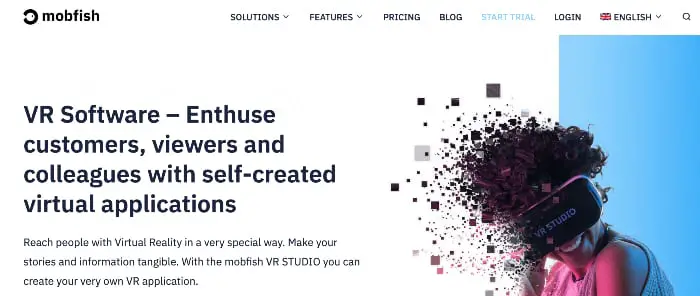
At the separate 24 September 2026 check, the site described mobfish VR STUDIO as a browser-based, no-code tool for building apps from 360° photos and videos, with exports for phones, desktop, WebVR and headsets including Meta Quest 3, Pico 4 Ultra and Apple Vision Pro. It said mobfish, based in Braunschweig, Germany, had become part of twinC GmbH. The recorded plans ran from a free, non-commercial tier to €399 a month (see pricing). These are historical observations. InstaVR and Headjack’s linked destinations returned pages during the 23 October check; signup and paid plans were not tested.
Original review experience: The first-person observations below are Dustin Jermalowicz’s coverage published in January 2020. Platform and pricing notes retain the separate 24 September 2026 check; the website availability warning was added on 23 October 2026.
I’m an ideas guy.
I have a lot of cool things running through my mind, but when it comes to computers, I often can’t because I don’t know how to program. With VR, this is a huge roadblock for me as well as many others.
This is where Mobfish (check website availability) comes in.
The company promises an easy-to-use service that allows anyone to create a VR app. Does it deliver?
Read our Mobfish review to find out.
What to Check Before Paying for VR Development Software
When it comes to software development, there is a lot to break down. Users need to look at the following before deciding to drop some coin on VR development software:
- Your hardware - If you’re going to be developing on your computer, you need to make sure your hardware is up to snuff. I work with a Mac, which is great for video editing, but developing software is a big burden. Make sure your computer is capable of running the software you’re buying.
- Cloud or local? - Some software choices can be powered in the cloud, which is nice as it takes the load off of your computer. If your computer isn’t great at software programming (like mine), the cloud may be the way to go.
- Professional or Recreational? - Gauge your needs with the price the software you’re looking at. The investment for professional software is often higher than that of apps for recreational development but includes more features. Look at the software you’re looking to release and base your investment off that.
The ideal consumer for VR editing software is a user that’s dedicated to actually putting something out.
If you’re not sure about developing an app, you shouldn’t put your money toward one.
If you are set on it though, you’re in the right place to find out if Mobfish is for you.
Presenting Mobfish VR Studio
Mobfish is a piece of cloud-based VR software, which lets you develop apps that feature 360-degree video and photo content. The service promises cross-platform compatibility as well as offline availability.
Mobfish claims their product requires little training, and in my case this was accurate as I had the basics down in a short amount of time.
- Web-based
- Available for offline use
- Works on WebVR, iOS/Android, HTC headsets, Oculus, and more
- Cloud transcoding, which takes the load off your platform
Pros
- Relatively easy to use
- Cloud-based
- High-quality product
Cons
- A bit pricey
- Trial includes watermarks
- Not for recreational developers
The cross-platform page, recorded in the 24 September check, lists some platforms that are no longer a good target. Facebook (now Meta) stopped accepting new Oculus Go apps and updates into its store on 4 December 2020, according to Wikipedia, and Microsoft says Windows Mixed Reality headsets are not supported on Windows 11 version 24H2 and newer. For new projects, Meta Quest, Pico, phones and the browser are the more practical outputs.
Mobfish VR Studio Pricing
These are the plans listed on the mobfish pricing page as of 24 September 2026. Prices are in euros and billed monthly; an app build is the package you upload to an app store.
| Plan | Price per month | Projects | App build fee | Notes |
|---|---|---|---|---|
| Free | €0 | 5 | Not available | Non-commercial use, WebVR only, watermark |
| Flex | €49 | Unlimited | €500 per build | 1 GB storage, 5 GB traffic |
| Standard | €199 | Unlimited | €20 per build | 100 GB storage |
| Agency | €399 | Unlimited | €20 per build | 1,000 GB storage and traffic |
Check the Mobfish websitePaid link
Features and Benefits of Mobfish VR Studio
As is to be expected of a product like Mobfish VR Studio, the company delivers a lot of different features, which each have benefits. Some of these features and benefits include:
Ease of Use
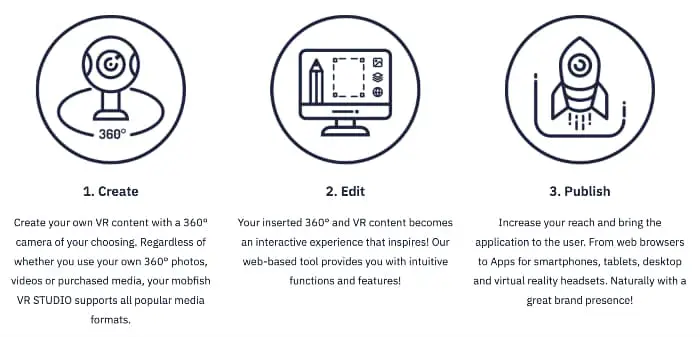
Okay, I can’t say that mobfish is as easy as dropping and clicking go, but it is pretty easy to use.
I used the documentation provided to get a good start on my software in under an hour.
I specifically like how the company breaks down the sections to set your app up “just right”.
The product is very good in this aspect.
Quality
In the past, I’ve had some problems with cloud processing of my videos, as the quality just isn’t there. This isn’t the case with mobfish though, as their online transcoding works well and I’m yet to notice any artifacts or pixelization from my videos being converted.
The app building quality is also pretty good, but you need to have that talent to make the product what it is. With that being said, the tools provided are good enough that if you have the skill, others will think you shopped the work out to another developer.
Interactivity

One thing that a lot of VR developers do that’s a mistake is not make their apps interactive.
Too many are a “click to start” and then require nothing else of the user.
Mobfish does allow for interactivity to be built in, which is key for use cases like education or show floor demos.
At the 24 September check, Mobfish’s browser output was described as WebVR. The original WebVR API has since been replaced by WebXR and removed from browsers. If you regain access to Mobfish, check that your project opens correctly in the browser of the headset you plan to use before paying for a plan.
Different Uses
As I mentioned above, there are multiple ways to use the mobfish service.
The service can be used to educate, be used as a marketing tool, trade show tool, and more.
In the end, the software is what you make of it, and will go as far as your mind takes you.
App Library
There are a ton of apps available in both the Apple Store and Google Play Store. Some are free, and others cost you. These apps range from simple games to 360-degree video apps. YouTube has an entire VR section you can check out, and it’s mostly free.
Keep in mind, however, that these apps are limited. You cannot play the higher-end VR games that require more processing power or full motion tracking.
What Others Are Saying About Mobfish
If you’ve read any of my other VR reviews, I always go looking for different opinions to see whether I’m off base or not. With Mobfish VR Studio, there isn’t a ton of information out there about user reviews or such.
I did find some user apps and videos. The linked app, Lostfriesland, an interactive documentary, now redirects to a Meta Store listing for Meta Quest.
Mobfish does have a YouTube channel as well where they explain the service.
Of course, since Mobfish is a German company, you’ll have to have YouTube auto-translate the captions to your native language to make heads or tails of what they’re saying. But!
They have also released a video in English on how to create your own VR app within a few minutes.
Check Mobfish website availabilityPaid link
Alternatives to Mobfish VR Studio
Since VR technology is still a niche category, you won’t find a ton of different apps for editing and creating VR software. With that said, there are still a few different choices to create VR apps or videos. Some of these alternatives include:
InstaVR
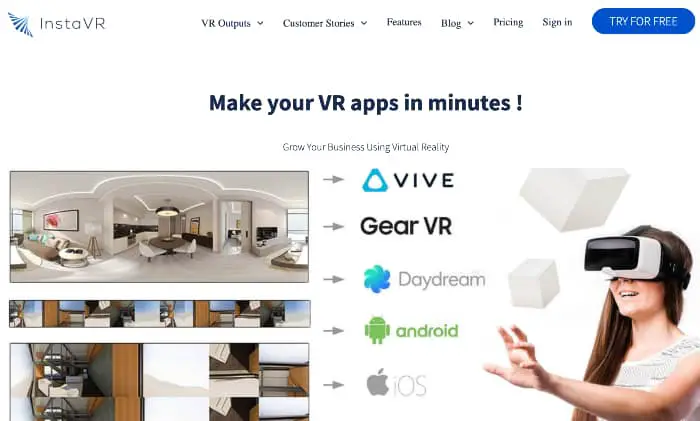
InstaVR is very similar to mobfish, as both allow you to create white label style apps that integrate VR video and photos. In terms of usability, I’d say that I give the edge to mobfish, but you really couldn’t go wrong either way.
Similarities
- Both allow for self-branding
- Multiple uses (education, marketing, etc).
- Available with multiple VR headset brands
Differences
- More expensive when billed monthly
- Unlimited projects in pro mode
- Includes heatmap for tracking where eyes go
The InstaVR homepage still invites you to sign up and try it, and lists Oculus Quest, Go and Rift S, iOS/Android/Cardboard and WebVR as outputs. It no longer shows public pricing, so we could not confirm the price and plan differences above.
Headjack

The Headjack app is wonderful as well, with the service offering up VR content management, analytics, and custom app creation. At the time of this review, Headjack had been used by big-name groups like Nat Geo and NASA, and it is easy enough for just about anyone to use.
Similarities
- Monthly billing available
- Unlimited projects on paid plans (both used to cap Pro at three)
- Deep in resources and documentation
Differences
- Includes detailed analytics
- Platform a bit nicer
According to the Headjack pricing page, checked 24 September 2026, there is a free plan with one white-label app and 100 views, and Pro costs $49 a month on an annual plan with unlimited apps, app store builds and offline mode.
Is Mobfish VR Studio Worth It?
Mobfish’s VR editing software is an excellent pro-grade service that’s ideal if your computer can’t handle processing VR video. I love the ease of use and various use cases for the software. I definitely recommend this to users who’re looking to develop a VR video app.
Our 23 October website check could not confirm current signup or plan availability. The table above preserves the plan figures recorded on 24 September; confirm access and current terms with Mobfish before paying for a project.
Research behind this guide
Check the linked specifications and support documents, or read how we research. Original review experience stays attributed to its author.
Explore the related guides in VR apps.