
Review of the Brookstone Virtual Reality Headset
We may earn a commission when you buy through links on this page. As an Amazon Associate I earn from qualifying purchases. How this works
Keep an existing Brookstone for simple phone viewing if the fit works. Its listed phone bay takes 4.7–6.2-inch screens, so measure before using it. Use an app with a compatible split-screen VR mode; YouTube’s Cardboard mode is Android-only. Brookstone did not list the headset at the September 2026 check, and stock was unconfirmed. For a first purchase, compare phone viewers and standalone headsets.
Headset alternatives discussed in this guide

Meta Quest 3S
128 GB configuration
Standalone VRStandalone games with Fresnel lenses.
Check first: Check the app library, optical fit and return policy.
Check price on Amazon Paid link · Amazon
Meta Quest 3
512 GB configuration
Pancake opticsPancake lenses and a higher-resolution display than Quest 3S.
Check first: Compare the complete purchase, including any accessories.
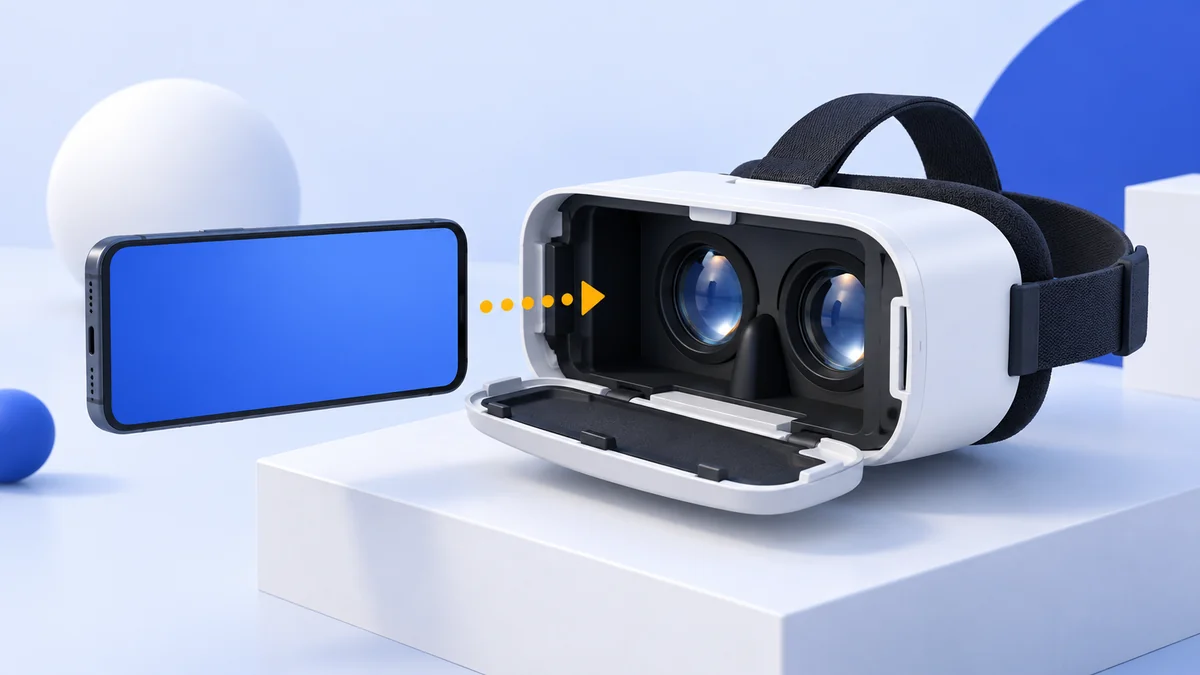
Check price on Amazon Paid link · AmazonThe Brookstone VR headset is a phone viewer with built-in headphones and adjustable lenses. Its listed 4.7–6.2-inch phone range makes fit the first check. Your phone runs the content, so confirm the app you want offers a split-screen VR mode.
This review keeps the original iPhone 8 setup and comfort observations. It also covers specifications, viewing controls and app limits before comparing alternatives for buyers who want simple video viewing or a fuller VR setup.
Product status and source notes
Still sold? No longer by Brookstone. We found no VR headset in the current range on Brookstone's website, which is now operated by Cart.com, so we treat this model as discontinued. The Amazon listing linked in this review may still exist, but we couldn't confirm stock or price. The specifications below come from the original listing and could not be re-checked against an official page.
Still usable? Only in part. It is a phone holder with lenses and headphones, so it still works with apps that offer a Cardboard-style split-screen mode, such as the Google Cardboard app for Android and iPhone (the iOS version needs iOS 15 or later). YouTube's Cardboard mode works only in the Android app. The 4.7 to 6.2-inch phone bay is a problem with current phones: in Apple's iPhone line-up, the 6.1-inch iPhone 17e fits that range, but the 6.3-inch iPhone 17 does not.
What to consider instead: a Cardboard-compatible viewer sized for your phone for 360-degree video, or a standalone Meta Quest 3S or Quest 3 for full VR. The Samsung Gear VR, Noon VR Pro and original Oculus Quest recommended below are discontinued. See what to buy instead.
About the original review: The review below was published in January 2020. First-person observations and original product comparisons refer to that coverage. Later status and compatibility notes are labelled separately.
3 Things You Need to Know Before Getting a VR Headset
Original review context (January 2020):
If you’ve been in a mall in the past two decades, you’re likely familiar with Brookstone, who sold gadgets and gizmos. Brookstone closed all 101 of its US mall stores after filing for bankruptcy in August 2018, but the brand still sells gadgets online.
Planning to deep dive into the world of virtual reality?
Well, check out these things before you lay your hands on any headset, as you don’t want to get caught flat-footed with a piece of tech that you can’t use.
Headset Compatibility
Not all VR headsets can be used with your smartphone. Review the device compatibility when you get it online or look at the product packaging if you get it from a retail store.
If you want to use the headset with a gaming laptop, make sure it works with one (a mobile headset won’t do the trick). Gaming consoles are designed to be used with specific headsets that work with them.
Make sure you pick the right headset for your needs.
What’s Your Budget?
I was itching to put this on the list. With a host of products available in the market today, you will be spoilt for choice. The more you’re ready to spend, the more features you can expect to get from your VR device.
From the affordable to the premium category, you can see mobile headsets going from $10 to nearly $100.
Your Phone’s Screen Size
If you’re using a mobile headset, you want to make sure your phone will fit.
Not all headsets fit all phones.
Some will go only up to 5.5 inches, so if you have a monster Note 9, you’re going to have to be careful when selecting a VR headset. Be sure to read a device’s specs to see what it can fit.
Presenting the Brookstone VR Headset
With Brookstone’s legacy as an innovative brand, I was eager to check out their VR headset. When I got my hands on this smart looking headset, I was all excited to try it out.
When unboxing the Brookstone VR headset, I found the headset and a soft cloth to clean the lenses. A helpful instruction manual that comes with the device, or you can download one from their website.
Specifications
- Soft face foam padding
- Built-in headphones
- Dimensions - 8.5 x 7.7 x 4.7 inches
- Comes with anti-fog lenses
- Field of vision – 120 degree
- Weight – 14.05oz
Pros
- Entry level affordable VR headset
- Simple and quick setup
- Smart design and looks
- Comes with adjustment knobs for lenses, pupil distance, earphone, focal length
- Compatible with iOS and Android devices from 4.7 to 6.2-inch diagonal screen size
- Suitable for people who wear glasses
Cons
- Not compatible with smartphone screen sizes larger than 6.2 inches
- You will need to pull out the phone to change the content
View the listing on AmazonPaid link · Historical or unverified listing
Features & Benefits of the Brookstone VR Headset
I have more than five VR headsets currently and try out more almost every week.
When I picked up the Brookstone model, I wanted a simple, affordable entry-level headset for use on the go. Does it deliver?
Design and Comfort
I like the design and comfort when I wear the headset. The face foam is quite soft, as is claimed by the manufacturer.
The three adjustable straps make for a secure and snug fit once I inserted my phone. I wore my glasses and then adjusted the pupil distance. It took a couple of minutes to adjust it to dial everything in.
After unboxing the headset, I flipped put in my iPhone 8 to use with it. With a 4.7-inch screen size, the phone made a perfect fit with the headset and comfortably slid into the phone panel.
I took off the phone case to make the fit better. A very slim phone case could go into the phone panel, but if your phone case is bulky it would be better to take the case off and then slide the phone in.
In the instruction manual, there was a QR code to pair up the device with the smartphone. I downloaded a virtual reality app on the smartphone and then calibrated it with the QR code to get the visuals right.
Viewing Experience
I was happy to see the touchscreen button placed right below the right eye cup. While it sucks not having a controller, a button does help things a bit.
I tried watching the first video without my glasses on, and to my surprise, it went well. The quality was decent once I ended up dialing in the IPD settings. Combined with the comfort, this made using the Brookstone headset a good experience.
Smartphone Compatibility
The Brookstone model rocks the smartphone compatibility criteria. It pairs up well with iOS and Android phones.
If you have a smartphone with a diagonal screen size of 4.7 inches to 6.2 inches, it is compatible with the headset. Anything smaller than 4.7 inches or larger than 6.2 inches won’t fit.
VR Content
Though Brookstone doesn’t have dedicated VR apps or content for you to explore, Google Play and the App Store come to your rescue! There is a whole world of apps, videos, movies, songs available on the stores, with no shortage of choice.
Some apps are certainly better than others, and you’ll find that Android devices have a lot more selection. This is due to Apple controlling more of their software. Still, there are some decent experiences to be had for your iPhone. I recommend Jaunt and the Discovery VR app.
Note: we couldn't confirm that the Jaunt or Discovery VR apps are still available in either app store, so don't count on them. The free Google Cardboard app is still offered for Android and iOS, and YouTube can play 360-degree video in Cardboard mode, but only in its Android app.
Social Proof
While I like this headset a lot, I wanted to see what others had to say about the device.
I went to Brookstone’s website to see what others have to say. It appears that a lot like the device, while some derided the experience as not being as immersive as other (more expensive) headsets.
Those reviews are no longer available: when we checked, the headset was not listed on Brookstone’s current website.
View the listing on AmazonPaid link · Historical or unverified listing
Alternatives to the Brookstone VR Headset
Not all mobile headsets are alike. If you think that the Brookstone headset may not be for you, I’ve included some alternatives to check out.
What to Buy Instead
The three original alternatives below are discontinued. Today we would look at:
- A Cardboard-compatible phone viewer. For 360-degree video and simple VR apps, any viewer that works with the Google Cardboard app is enough. Check that its phone bay fits your phone, as most current phones are 6.1 inches or larger. Our guide to VR headsets under $50 covers budget options.
- Meta Quest 3S. A standalone headset with its own screen, processor and controllers, so no phone is needed. As of 24 September 2026, Meta lists it from $349.99 (128 GB) (also on Amazon).
- Meta Quest 3. Meta’s higher-end model with sharper optics, listed from $599.99 (512 GB) on the same page as of 24 September 2026 (also on Amazon). See our Quest 3 vs Quest 3S comparison.
Samsung Gear VR with Controller (Discontinued)
Samsung Gear is a highly popular VR headset with tons of users worldwide.
Ergonomic design, lightweight and comfortable to wear, it’s almost like a staple if you have a Samsung smartphone. It had a large library of VR apps, games and movies from Oculus. Gear VR is no longer made, and in 2020 Facebook stopped adding new features to it through Oculus software updates, closed the Oculus Store to new Gear VR apps and pulled the Oculus Video app; Samsung also dropped VR support from newer Galaxy phones, starting with the Galaxy Note 10 and S20.
Similarities
- High-quality optical lenses
- AR & VR supported
- 360-degree viewing experience
Differences
- Samsung Gear has a very immersive experience with superior quality
- Brookstone doesn’t come with a controller
- Samsung Gear users have access to better VR apps
View the listing on AmazonPaid link · Historical or unverified listing
Noon VR Pro Headset (Discontinued)
If you’re looking for a similar VR headset to the Brookstone, then the Noon VR Pro fits the bill.
It has all of the functionality of the Brookstone, with the added benefit of PC to headset streaming.
I do like this headset a lot and feel it stacks up favorably to the Brookstone.
We now treat the Noon VR Pro as discontinued too; our Noon VR Pro review has its current status.
Similarities
- Branded headset model
- Mobile VR headset
- High-quality stereo headphones
Differences
- Includes PC to headset streaming
- Not a big-name brand like Brookstone
View the listing on AmazonPaid link · Historical or unverified listing
Oculus Quest All-in-One Gaming Headset (Discontinued)
Oculus Quest is the ultimate in standalone VR headsets. It offers wireless functionality and near PC level experiences. If you want a top-of-the-line device, the Quest is one of the best options I’ve come across.
The original Quest was discontinued in 2020, and Meta phased out its software support between 2023 and 2024.
Similarities
- Wireless
- Quick and simple set up
Differences
- Near PC-level experiences
- Includes Touch Controllers
- Tied to the Oculus ecosystem
View the listing on AmazonPaid link · Historical or unverified listing
Conclusion
If you want a simple, no-frills headset that works with your smartphone on the go, Brookstone fits the bill.
I really enjoy it for the built-in comfort, and recommend it as a mobile VR device. Check it out here.
If you want a top-tier experience, I recommend the Oculus Quest. It’s a lot pricier, but it’s worth it if you think you’re going to be using VR for the long run. Check out the Quest here.
Note: both products in this conclusion are discontinued. Brookstone no longer lists its VR headset, and the original Oculus Quest has been succeeded by newer models; Meta's current headsets are the Meta Quest 3S and Quest 3. If you already own the Brookstone headset and a phone that fits, it still works as a basic viewer for Cardboard apps; otherwise, see what to buy instead.
Research behind this guide
Check the linked specifications and support documents, or read how we research. Original review experience stays attributed to its author.
View 10 sources
- Brookstone (Wikipedia)
- Brookstone official website
- Google Cardboard (Google AR & VR)
- Google Cardboard app (Apple App Store)
- Watch VR videos and 360 videos (YouTube Help)
- Compare iPhone models (Apple)
- Meta Quest headsets compared (Meta)
- Facebook ends Gear VR updates (UploadVR)
- Samsung Gear VR (Wikipedia)
- Oculus Quest (Wikipedia)
Explore the related guides in VR headsets.