How Does Virtual Reality Work? A Plain-English Guide
We may earn a commission when you buy through links on this page. As an Amazon Associate I earn from qualifying purchases. How this works
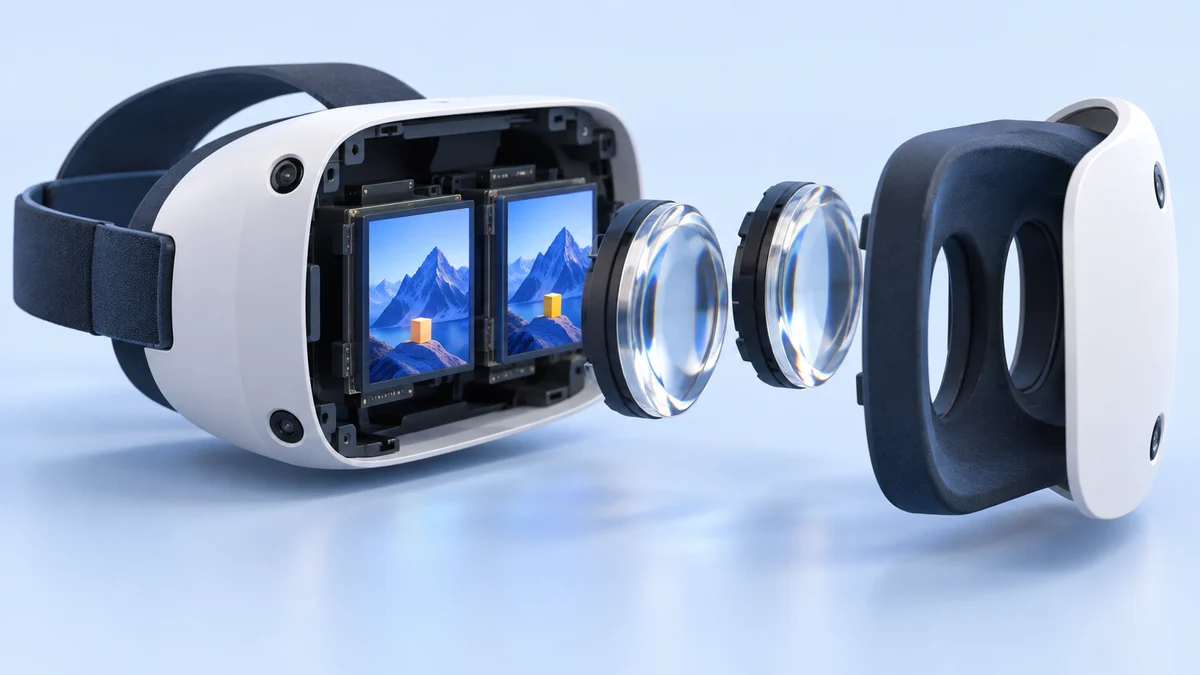
A VR headset shows each eye a slightly different image to create depth. Lenses bring those images into focus, and tracking updates the scene as you turn or move your head. Spatial audio helps place sounds around you; controllers or hand tracking let you interact. Before buying, check where the apps run: a standalone headset supplies its own processing, while PC or console VR needs a compatible computer or console.
Virtual reality (VR) uses a headset to show a computer-generated world that responds to your movement. Understanding the basic parts helps you compare headsets and work out what else a complete setup requires.
This guide explains displays, lenses, head tracking, sound and touch before comparing how current headset designs combine them. It also separates everyday features from experimental smell and taste technology, so you can tell which promises matter for your first purchase.
Compatibility and source notes
Hardware and price status checked 24 September 2026.
The basics haven't changed: a headset still shows a slightly different image to each eye through lenses, tracks your head so the picture moves with you, and adds 3D audio and controller vibration. What has changed is the hardware: tracking cameras are built in, 90–120 Hz is normal, hand tracking is standard, and some headsets also track your eyes.
Headsets named in this guide: the original Oculus Quest was discontinued in September 2020, the Oculus Rift was replaced by the Rift S in 2019 and the Rift S was discontinued in 2021, the original PlayStation VR was sold from 2016 to 2024, and the Samsung Gear VR was discontinued when Samsung ended its XR services on 30 September 2020 (Wikipedia, Wikipedia, Wikipedia, Wikipedia).
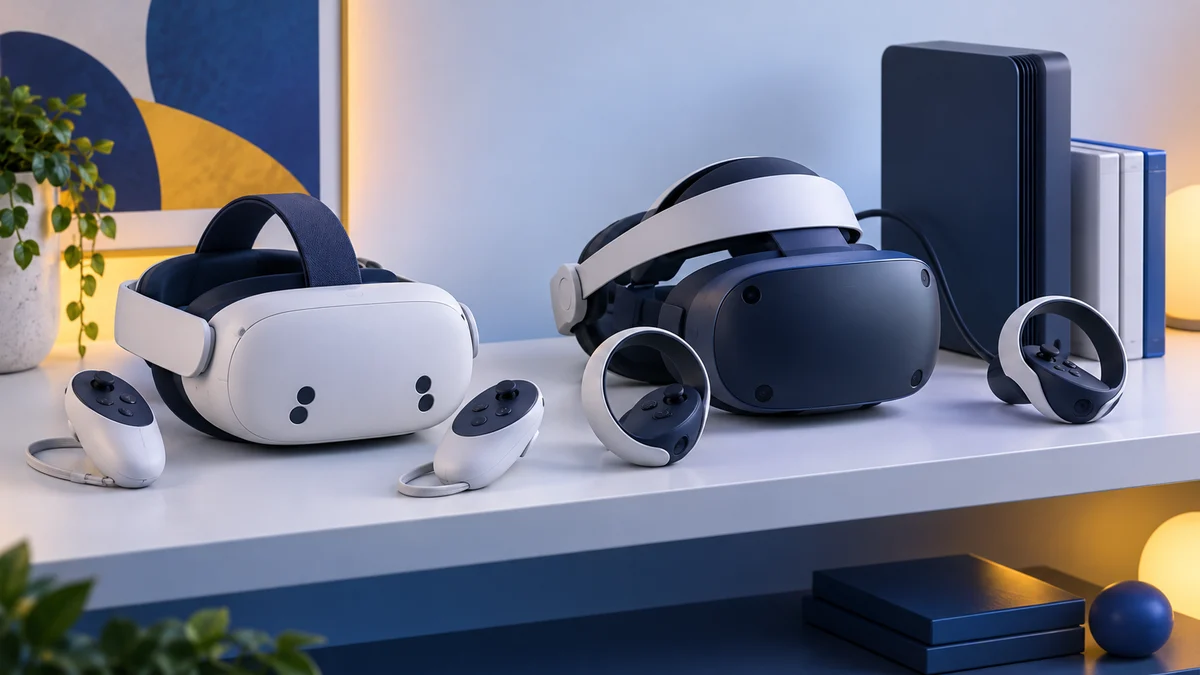
What to look at instead: the Meta Quest 3S ($349.99) and Meta Quest 3 ($599.99), US prices since 19 April 2026 according to Meta, and PlayStation VR2, which needs a PS5. See how current headsets put it together below.
What Is Virtual Reality?
You probably realize that VR is about simulated environments, but there is much more to virtual reality than gazing at a world generated by a computer.
Depending on the level of the technology, virtual reality is about seeing and feeling experiences that are prompted by computer-generated worlds, people, and environments.
The visual aspects of a virtual world are easy to understand if you have played a video game or watched a movie, but the full virtual reality experience stimulates the entire range of human senses.
Advancements in virtual reality technology may allow us to experience the feeling of icy mountain streams, the smell of untouched wilderness, and the echoes of footsteps in a deep canyon.
In some circles, this highly advanced version of simulation is known as full-dive VR. While full-dive VR is not yet available, we already can hear and see virtual worlds through current technologies.
I became familiar with this early VR technology through the Oculus Quest, a headset that allows people to play video games in the first-person perspective.
Note: the original Oculus Quest was discontinued in September 2020, when the Quest 2 replaced it, and Meta limited its updates to maintenance and security patches until 2024, according to Wikipedia. Meta's current standalone headsets are the Quest 3S and Quest 3.
When paired with three-dimensional audio, VR gaming feels like an immersive experience. You might be wondering how strapping a screen to your face immerses you into a virtual world.
The answer is not simple, but it is about using optical tricks to convince your brain into believing that the two-dimensional images on the screen are actually a three-dimensional world.
How Does a VR Headset Work?
At the heart of a quality VR experience is the headset – a display mounted on the head of the end-user which blocks out the physical world and displays an imaginary digital world in its place. Current VR headsets present a whole new field of view for the end-user, making full use of our peripheral vision to provide a realistic experience. When you are wearing a good quality VR headset, you should feel as if you are interacting with the virtual world.
Once the headset is on, the user can use motion controls such as gloves, remotes and body movements to control their on-screen experience. As the user looks around with his or her head, the scene will adjust using motion controls.
Early VR headsets were not as immersive as the Oculus Rift and Samsung VR systems that were on the market when this guide was written. Those models are now discontinued; today’s headsets from Meta, Sony and Apple build on the same ideas.
Most headsets now also work without a PC. A standalone headset such as the Meta Quest 3 or 3S has its own processor, battery and tracking cameras, while PlayStation VR2 connects to a PS5 (and, with Sony’s adapter, to a PC for Steam games, according to PlayStation).
The extent to which VR games and worlds can be interacted with depends on the publisher; with VR, the possibilities may well soon be limitless.
Seeing Is Believing: Displays, Lenses and Tracking
Virtual reality technology begins with our eyes and the use of stereoscopic images. Using a headset, two images are presented to our eyes, one for each eye. The images are slightly different to reflect the way our eyes have two slightly different perspectives.
For example, if you hold a cup in front of you, your right eye will see the cup from a slightly different angle than your left. By showing you different images for each eye, these images work together to create a more natural looking image.
Lenses between the screens and your eyes focus the image and stretch it across a wide field of view, so all you see is the virtual image. Sony quotes a field of view of about 110 degrees for PlayStation VR2, and the Meta Quest 3S has about 96 degrees horizontally against roughly 110 for the Quest 3 (Wikipedia). Many headsets use lightweight Fresnel lenses, whose distortion is corrected in software (Wikipedia); the Quest 3 uses thinner pancake lenses.
A high refresh rate matters too, because a stuttering image is one cause of motion sickness. The original PlayStation VR ran at 90 or 120 Hz, and current headsets such as PlayStation VR2 and the Meta Quest 3 and 3S run at 90–120 Hz (PlayStation, Wikipedia). If motion sickness is a problem for you, see our guide to VR motion sickness.
Every current headset uses motion tracking, or head tracking, so the image changes as you move your head. Motion sensors such as gyroscopes and accelerometers detect rotation (three degrees of freedom), while cameras add position tracking so you can also lean, crouch and walk (six degrees of freedom). Older systems used external sensors: Sony’s original PSVR relied on the PlayStation Camera and nine LEDs on the headset, and the original Oculus Rift used external cameras. Current headsets use “inside-out” tracking with cameras built into the headset; PlayStation VR2, for example, has four embedded cameras that track both the headset and the controllers, according to Sony’s specifications.
A key development in head tracking was overcoming latency, or how quickly the image changes compared to when you move your head. The delay needs to be much shorter than the 50 milliseconds this guide originally suggested: a Valve engineer has put the ideal at 7–15 milliseconds (Wikipedia), and Apple quotes 12 milliseconds photon-to-photon latency for the Apple Vision Pro.
Some headsets now also track your eyes. PlayStation VR2 has an infrared eye-tracking camera for each eye, and the Apple Vision Pro uses four eye-tracking cameras. This allows foveated rendering: only the area you look at is drawn in full detail.
Taking Sound to the Next Level
Our sense of hearing greatly affects how immersed we become in a virtual environment. The development of binaural audio has greatly improved the virtual reality experience. For decades, we’ve had stereo audio, which has two channels of audio that can be different. So, the sound in the left channel may be a little (or a lot) different from the sound in the right channel.
Binaural audio is similar, but has one important difference. Binaural audio is recorded with two microphones specifically located on a person’s head as close to their ears as possible. This not only gives different sound on the left and right, like stereo would, but also accounts for the acoustic effect a person’s head has on how they hear the sounds around them, making it more natural sounding than stereo.
VR games rarely rely on pre-recorded binaural tracks. Instead, as Wikipedia explains, single sound sources are processed through a binaural panner in real time, based on where you are facing, which helps you locate sounds outside your field of vision. Apple calls its version “Spatial Audio with dynamic head tracking” on the Vision Pro.
Reach Out and Touch the World
Walking around a virtual world and seeing and hearing that environment is great, but wouldn’t you like to be able to interact with that world? Commercially available haptic interfaces are still in their infancy, but researchers are making strides to improve the physical interaction you can have with the virtual world.
For most people, touch in VR still means controller vibration. The PlayStation VR2 Sense controllers add adaptive trigger resistance and capacitive sensors that detect your fingers, and the headset itself can vibrate, according to Sony.
There are two aspects to virtual physical interaction, feeling the environment around you and affecting that environment. For example, can you feel it when you are hit with a virtual ball and can you then pick that ball up and throw it?
These haptic wearables range from gloves to full body suits and are being designed to not only give the sensation of touch, but have a sense of the hardness of an object. They also incorporate motion and position sensors to allow you to feel the objects in space and manipulate the virtual objects.
There are a variety of methods being used to create these haptic devices, such as exoskeletons, fluidics, cables and electronic strips.
- Exoskeleton - Hard external structured devices that fit around the user’s hand, arm, or other part of the body and allow for interfacing with the computer. These tend to be large and bulky, but allow for good tracking and haptic feedback. One current example is the SenseGlove R1, an exoskeleton glove for tele-robotics with force and vibration feedback, listed on SenseGlove’s website.
- Fluidics - Fluidic haptic devices allow for a more flexible, soft design. They use fluids to detect movement from the user and create force on the user giving the sense of touch. You can read more about one fluidic design here.
- Cables - Quite different from the wearable designs, cable haptic devices use cables connected to different points within a three dimensional environment. The user stands in the environment and moves a controller which pulls and releases the cables. The computer is able to interpret location and apply resistance for feedback. You can see a video of this here.
- Electronic Strips - Electronic strips are similar to the exoskeleton design, but without all the bulky hardware. Light, flexible metal strips line the hand. They are able to detect movement as the strips move past each other. By applying a small electrical current to the strips, the device can create resistance for the user giving the sense of touch. You can see one example of an ultra-light glove from EPFL that uses electronic strips in this video.
Haptic gloves such as SenseGlove’s wireless Nova 2 are on sale, but mainly to businesses and researchers rather than gamers.
What’s That Smell?
Imagine walking through a field. You not only see the grass and flowers and hear the wind and birds, but the field has a smell. That’s part of the experience and one that has been largely ignored by most VR companies, but as Engadget reported in a November 2017 article, some companies are working on methods of producing smells to further immerse people in the VR experience.
Researchers such as Nimesha Ranasinghe, then at the National University of Singapore, have built devices that release scents close to the user’s nose. His team’s Vocktail uses three scent cartridges that can be mixed, while a commercial device described in the same Engadget article, CamSoda’s OhRoma, holds 30 different scents. Scent devices remain experimental.
Water Has Never Tasted Better
We have long known that smell affects our sense of taste as well. Anyone with a cold can tell you their food tastes different, less vibrant. Ranasinghe and his team found that by utilizing smell, they could effectively cause users to taste different flavors for a drink that was just pure water. To enhance the experience, color and electronic taste stimulators were used as well. You can see this in this virtual cocktail video made by his team.
Immersion and Interaction: VR’s Primary Features
The overriding goal of VR technology manufacturers is to completely immerse the end-user in a simulated world, but what does this mean?
Simply put, immersion means that the end-user is completely distracted from the outside world in terms of their vision and hearing by using a headset which fills peripheral vision, headphones which cancel out external noise and controls which allow manipulation of the virtual world.
When these three things are met, VR can create a truly immersive experience which provides a powerful distraction from the outside world and drops the end-user right in the middle of something completely new.
Developers are always looking for new ways to improve the interactivity of their worlds, and PlayStation VR is a good example of this. Using its motion controllers, players can pick up and move objects, interact with characters and manipulate the world. The original PlayStation VR has since been replaced by PlayStation VR2, whose Sense controllers also detect where your fingers are.
Controllers are no longer the only option. Meta Quest headsets can track your bare hands with their cameras, and the Apple Vision Pro is controlled with your eyes, hands and voice, according to Apple. Color passthrough cameras on the Quest 3, Quest 3S and Vision Pro also let you see your room with virtual objects placed in it, which is usually called mixed reality.
As more and more competitors continue to develop their VR products and games, the market is bound to continue evolving and the limits of VR will be pushed higher.
How Current Headsets Put It Together
Three headsets on sale today, with US prices checked 24 September 2026:
| Headset | Runs on | Tracking | Refresh rate | Price |
|---|---|---|---|---|
| Meta Quest 3S | Standalone | Inside-out cameras, hand tracking | 90–120 Hz | $349.99 (128 GB) |
| Meta Quest 3 | Standalone | Inside-out cameras, depth sensor, hand tracking | 90–120 Hz | $599.99 (512 GB) |
| PlayStation VR2 | PS5 (PC with adapter) | Four headset cameras, eye tracking | 90 or 120 Hz | Not shown on Sony’s product page |
For more hardware choices, see our VR headsets section and our Meta Quest 3 vs Quest 3S comparison.
What Does the Future Hold?
It’s hard to say what the future has in store for VR. A couple of decades ago, we never would have thought such a thing would be possible!
Our prediction, though, is a shift in focus from interaction to immersion – products which don’t just replicate sight and sound, but smell and taste too.
Anything is possible.
As it currently stands, however, VR is a very powerful and exciting technology. A VR headset should be at the top of any gamer’s list. It is a technology which provides an immersive and interactive gaming experience which cannot be achieved through a screen alone.
Developers are working tirelessly to deliver on VR’s shortfall and it is an exciting time to get involved with a technology set to define a generation of not only gaming, but fitness, movies and general day-to-day activities.
Got more questions about VR? Browse our other VR guides.
Research behind this guide
Check the linked specifications and support documents, or read how we research. Original review experience stays attributed to its author.
View 15 sources
- PlayStation VR2 tech specs (PlayStation)
- PlayStation VR2 (PlayStation)
- Meta Quest pricing update (Meta)
- Meta Quest 3 (Meta Store)
- Apple Vision Pro technical specifications (Apple)
- SenseGlove haptic gloves (SenseGlove)
- Smellable VR is coming (Engadget, November 2017)
- Oculus Quest (Wikipedia)
- Oculus Rift (Wikipedia)
- PlayStation VR (Wikipedia)
- Samsung Gear VR (Wikipedia)
- Meta Quest 3 (Wikipedia)
- Meta Quest 3S (Wikipedia)
- Virtual reality headset (Wikipedia)
- Binaural recording (Wikipedia)
Explore the related guides in VR guides.