Best Headphones for PS VR2 and PSVR: What Works and How to Connect
We may earn a commission when you buy through links on this page. As an Amazon Associate I earn from qualifying purchases. How this works
PS VR2: Sony says you can use headphones that "fit comfortably with the PS VR2 headset and have a 3.5mm jack audio cable or are wirelessly compatible with the PS5 console". Start with the earbuds in the box. After that, try a wired pair you already own, clip-on headphones such as the Bionik Mantis Pro, or Sony's PULSE Explore earbuds through their USB adapter. Regular Bluetooth headphones, including AirPods, won't pair with a PS5.
Original PSVR: any wired headphones with a 3.5mm plug, in the jack on the headset (model CUH-ZVR2) or on the inline remote (CUH-ZVR1).
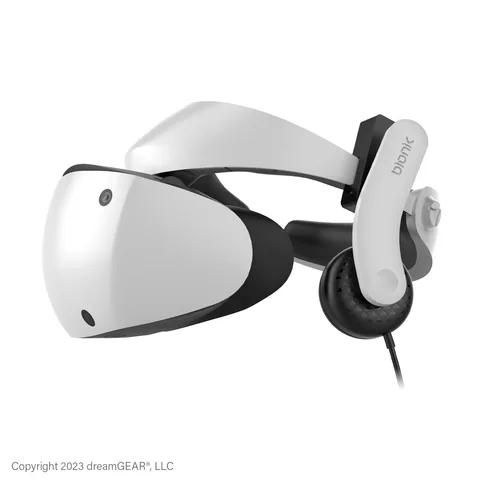
Model BNK-9100
Clip-on, on-ear or over-earClips onto the PS VR2 headband and plugs into its jack; each side flips off your ear.
Check first: Bionik’s own store showed it as coming soon; check the seller.
Check price on Amazon Paid link · Amazon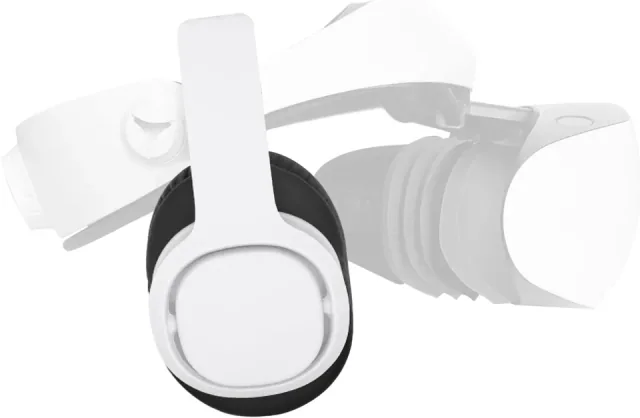
Clip-on headphones for PS VR2
Clip-on with tidy cablingClips onto the side straps, with a cable routed under the rear band, according to its maker.
Check first: Its maker says the sound is good enough for gaming, not for audiophiles.
Check price on Amazon Paid link · Amazon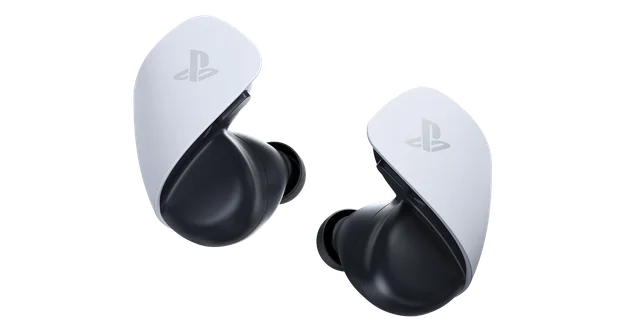
Model CFI-ZWA2 · white
Wireless, named by SonyConnects to the PS5 through its PlayStation Link USB adapter; Sony says it works with PS VR2.
Check first: Up to 5 hours per charge, plus 10 from the case, according to Sony.
Check price on Amazon Paid link · AmazonSony lists a stereo headphone jack as PS VR2's audio output and puts stereo earbuds in the box. Anything else you use connects one of two ways: by cable to that jack, or wirelessly to the PS5 itself.
This guide covers what works with PS VR2, five options worth trying and what happens with wireless and Bluetooth headphones. Further down are the original picks for the first PSVR and where to plug headphones into each headset.
How we chose, and source notes
Checked 16 October 2026. We haven't tested these headphones. Compatibility comes from Sony's PS VR2 pages and support articles, and product details from each maker. Prices are the makers' own: PlayStation Direct US listed PULSE Explore at $149.00, and Bionik lists the Mantis Pro at $59.99, though its own product page showed "Coming soon".
Can you still buy PS VR2? Sony's US store no longer listed the headset on 15 October 2026. Our PS5 VR headset guide covers where to find one.
The original PSVR: the 2016 headset is no longer made. Wikipedia gives its lifespan as 2016–2024, and Sony stopped supplying the PlayStation Camera adaptor needed to use it on a PS5 from 26 November 2024, according to its important notice. Any wired headphones with a 3.5mm plug still work with one you already own.
The original picks: Sony's Gold and Platinum Wireless headsets no longer appear on Sony's accessories page, which lists the PULSE Explore earbuds and PULSE Elite headset instead. The original author's favourite was the Platinum Wireless Headset; it now mainly applies if you already own one.
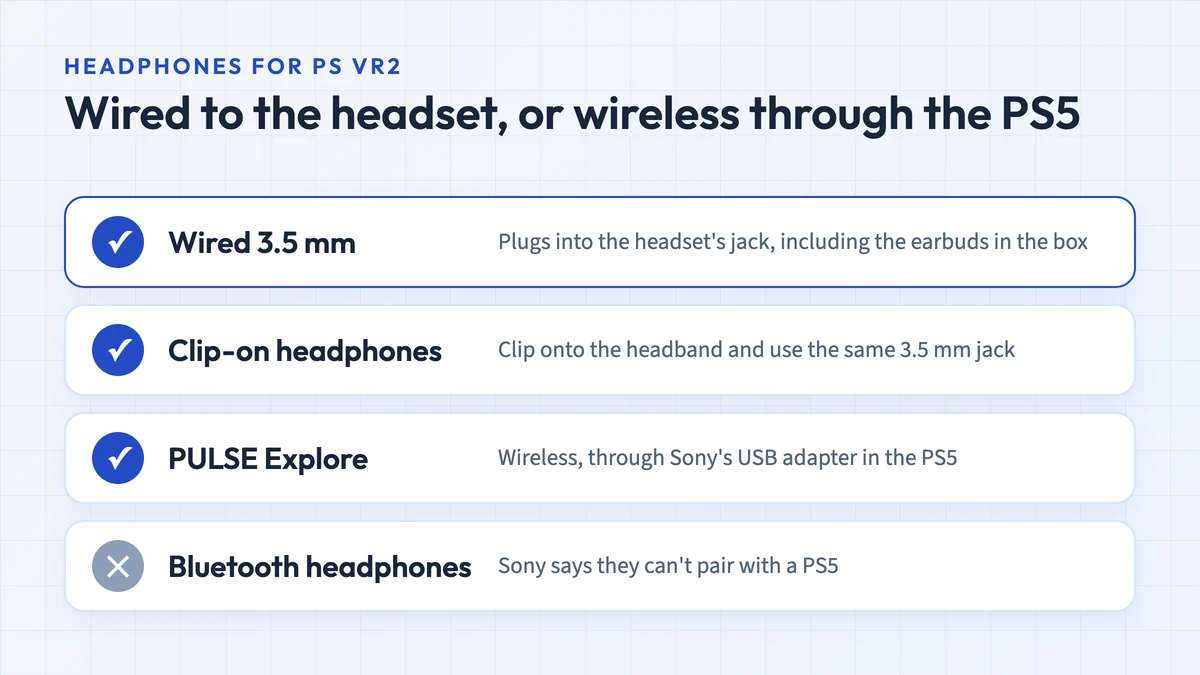
Which headphones work with PS VR2?
| Option | How it connects | What to know |
|---|---|---|
| Earbuds in the box | 3.5mm jack on the headset | Included, with three pairs of earpieces |
| Any wired headphones with a 3.5mm plug | 3.5mm jack on the headset | Sony's only condition is that they fit comfortably with the headset |
| Clip-on headphones (Bionik Mantis Pro, Globular Cluster PH2) | Clip onto the headset; plug into its 3.5mm jack | Made for PS VR2, so there's no second headband |
| PULSE Explore earbuds | PlayStation Link USB adapter in the PS5 | The wireless option Sony names for PS VR2 |
| Other wireless headsets with a USB adapter, such as PULSE Elite | USB adapter in the PS5 | Covered by Sony's rule, but Sony doesn't name them for PS VR2 |
| Bluetooth headphones and AirPods | Not directly | Sony says they can't pair with a PS5 |
Sources: Sony’s PS VR2 specifications and audio FAQ, PS VR2 page, PULSE Explore support page and Bluetooth support article, checked 16 October 2026. For Tempest 3D audio, Sony’s PS VR2 page says you need analog or USB stereo headphones.
Headphone picks for PS VR2
The earbuds in the box
Every PS VR2 comes with stereo earbuds and three pairs of earpieces, according to Sony. They plug into the headset’s jack, so try every earpiece size before you buy anything. Upgrade if they won’t stay in comfortably, or if you’d rather have nothing in your ears.
A wired pair you already own
Any headphones with a 3.5mm cable work, Sony says, as long as they fit comfortably with the headset. In-ear models avoid the question of how two headbands sit together. With over-ear headphones, check that their band and PS VR2’s headband don’t press on each other, and try them while you can still return them.
Bionik Mantis Pro: clip-on, on-ear or over-ear
Bionik’s Mantis Pro (model BNK-9100) is made for PS VR2. It clips onto the headset band, plugs into the headset’s jack, and each side flips onto or off your ear. It works on-ear, or over-ear with the two included pads, which Bionik says block ambient noise. Bionik also says it works on the original PlayStation VR. Its store lists a $59.99 regular price, though the product page showed “Coming soon” on 16 October 2026.
Check price on AmazonPaid link
Globular Cluster PH2: clip-on with tidy cabling
Globular Cluster’s PH2 is another clip-on pair for PS VR2. Its listing says the headphones clip onto the side straps, with a cable router under the rear band, so you don’t need to plug in a cable each time you put the headset on. The maker is frank about the sound: “good enough for normal user/ normal gaming”, but “not for audiophiles”.
Check price on AmazonPaid link
Sony PULSE Explore: the wireless option
PULSE Explore earbuds connect to the PS5 through the PlayStation Link USB adapter in the box. Sony’s support page says you can use them with PS VR2 once they’re connected, and to disconnect any headphones from the headset first. Sony quotes up to 5 hours per charge, plus 10 more from the case, and two hidden mics. They also connect directly to a phone or tablet. PlayStation Direct US listed them at $149.00 on 16 October 2026.
Check price on AmazonPaid link
Do wireless and Bluetooth headphones work with PS VR2?
Wireless headphones work if they connect to the PS5 itself, usually through a USB adapter. Sony’s PS VR2 FAQ allows audio devices that are “wirelessly compatible with the PS5 console”. That covers the PULSE Explore, and by the same rule other adapter-based headsets such as the PULSE Elite, though Sony names only the PULSE Explore for PS VR2.
Regular Bluetooth headphones don’t connect directly. Sony’s support article says pairing Bluetooth headphones with a PS5 “won’t be possible”, because of latency and because the controller already uses Bluetooth bandwidth. A third-party Bluetooth adapter plugged into the PS5 can connect them, but Sony “doesn’t guarantee compatibility or performance”.
New Sony headsets are coming. On 15 September 2026 Sony announced the PlayStation Pulse and Pulse Edge, both using PlayStation Link. The Pulse is due in select markets this holiday season and the Pulse Edge in early 2027, and prices haven’t been announced. The announcement doesn’t mention PS VR2.
The older PULSE 3D headset came with a 3.5mm cable that Sony says plugs into the original PlayStation VR. Its product page had no buy button when we checked.
Our original picks for the first PSVR
The original author wrote these seven picks for the first PlayStation VR, and we haven’t re-tested them. We’ve removed the shopping links for models we couldn’t confirm are still made. The wired ones also plug into PS VR2’s 3.5 mm jack, if they fit comfortably with the headset.
7. 1MORE Triple Driver In-Ear Earphones
The 1MORE earphones are as good a sound as you can get from an earbud. They have 3 drivers which create a rich, balanced sound from the bass through the highs. A Grammy Award-winning sound engineer designed the interior design of these earbuds.
The earphones do not have active sound cancellation, but if you use the proper sized silicone tip to get a correct seal, you should block most of the outside noise. They have an ergonomic design to fit your ear comfortably, and they look pretty awesome as well.
The attached microphone is a high-quality MEMs mic which shouldn’t necessarily replace the built-in PSVR mic but will serve you well if you also use the earphones with your phone.
If you prefer an earphone over a headphone, these are likely to be great choices for you.
Pros
- High-quality sound that would beat many headphones
- Lightweight, ergonomic design
- Wired
Cons
- No active noise canceling
6. Sennheiser GAME ONE Gaming Headset
The GAME ONE is a gaming headset that also works with the PSVR’s 3.5mm jack. It has an excellent quality sound, though not the best on this list. The headphones are lightweight and have a pad at the top of the headband for comfort.
These are open-back, over-ear headphones, so they let in more outside sound than closed designs; the noise cancelling is in the microphone, not the ear cups. They also have vents built into the cups (the part of the headset that goes over your ears) and use breathable plush velour cover to keep your ears ventilated and cool during long periods of use.
What sets these headphones apart on this list is the built-in, boom arm microphone. This microphone is sensitive to a wide range of frequencies to ensure a high-quality sound. It also has noise canceling technology in the microphone to remove distracting ambient noise when speaking.
If you intend to record your voice while playing, these headphones are definitely worth considering.
Pros
- Good quality audio
- Over-ear design
- Comfortable and lightweight
- Ventilated
- Built-in high-quality microphone
Cons
- Not the highest quality audio available
5. Bionik BNK-9007 Mantis Headphone
The Bionik BNK-9007 Mantis headphones are specifically designed for the PlayStation Virtual Reality headset. They snap onto the sides of the headset like integrated headphones and are easy to attach.
Each side has a separate cord which connects to the appropriate side of the VR headset. The wires are relatively short, preventing excess dangling, though they aren’t as well concealed as the headphones that come on the PSVR.
The quality of these headphones is not nearly as good as other headphones on this list, but their designed integration makes them unique to the list. They are light, dust resistant, and you can adjust their position to fit your ear.
If you don’t wish to fumble around looking for your headphones after you put on your virtual reality headset, these headphones might be just what you need.
Update (October 2026): Bionik now makes the Mantis Pro for PS VR2, and says it also works on the original PlayStation VR.
Pros
- Attaches directly to the PSVR headset
- Adjustable positioning
- Lightweight
Cons
- On-ear design
- Above average, but not great audio quality
4. PlayStation Gold Wireless Headset
The PlayStation Gold Wireless headphones produce an excellent sound quality. You will get a great sense of the virtual surround sound with their built-in 7.1 virtual surround sound. Unfortunately, they don’t have 3D sound like their next generation Platinum headphones.
The versatility of these headphones makes them stand out. They are wireless, but also have an optional 3.5mm cable which allows you to connect wirelessly when playing regular console games and directly to the PSVR headset when playing VR games. The headphones are compatible with both the PS3 and PS4 as well. So, if you have an old PS3 that you like to play, these will work just fine.
These headphones are comfortable and easy to wear. They also have swappable faceplates so you can choose your style.
If you want to have headphones that work with your old PS3 or if you don’t want to drop as much money as you would for the PlayStation Platinum Headset, these headphones should work well for you.
Pros
- Wired and wireless
- Designed for PlayStation and easy to connect
- Magnificent 7.1 virtual surround sound
- Compatible with PS3, PS4, and PSVR
Cons
- Do not have 3D audio
3. Bose QuietComfort 25 Headphones
Bose is known for their high-quality audio sound systems, and the QuietComfort 25 headphones don’t disappoint. They have excellent sound quality with clear highs and deep lows. They will give a good sense of virtual surround sound like all stereo headphones plugged into the PSVR headset will, but do not have built-in 7.1 virtual surround sound or 3D audio.
I chose the QuietComfort 25 over the newer 35 series due to the wired connection. The 35 series is wireless and doesn’t appear to have a wired option. While wireless is great, it’s not worth losing the virtual surround sound from plugging directly into the PSVR headset.
Where the QuietComfort stands out is sound cancellation. Between a tight fit around your ear and active noise canceling technology, it eliminates nearly all outside noises, enhancing the immersive virtual reality experience.
The headphones are lightweight and comfortable and come with a nice and compact carrying case.
If you tend to play in noisy areas and want to block all outside noise and leave the world behind, these may be the headphones you were looking for.
Pros
- Excellent full-range sound quality
- Among the best noise cancellation technology
- Lightweight and comfortable
Cons
- Do not have built-in 3D audio
2. Sennheiser HD 598 Cs Closed Back Headphone
Built with high-quality, premium components, the Sennheiser HD 598 Cs headphones will give you a beautiful high definition sound that challenges any headphone on the market.
Their closed-back design blocks most outside noise, leaving you with the sounds of your virtual environment. That isolation comes from the closed ear cups rather than active noise cancelling.
The headphones are lightweight and beautifully crafted by one of the best audio design companies in the world. Their soft leatherette earpads give a luxurious feel.
If you want an excellent sound, with good noise isolation and a luxurious feel, these headphones should work perfectly for you.
Pros
- High-quality HD audio
- Lightweight and comfortable
- Closed-back design blocks outside noise
Cons
- 3D audio is not built-in
1. Sony PlayStation Platinum Headset
Sony’s PlayStation Platinum Headphones are among the best in the market. They offer phenomenal 7.1 virtual surround sound with 3D audio. The headphones also provide adjustable levels so you can customize your audio experience.
These headphones are wireless but also come with a 3.5mm stereo cable. This gives you the best of both worlds. When you are listening to music or playing non-VR games, you can use the wireless feature, so you aren’t tethered to your console. When you are playing VR games, you can plug into your PlayStation VR headset for the full 3D virtual surround sound experience.
Some people have complained that too much outside noise is allowed in because the headphones don’t fit well enough to your head, but there are only a few headphones which can match the Platinum headset.
If you want one of the best headphones for virtual reality gaming, these are your top choices.
Pros
- Excellent sound quality
- Easy to connect
- Both wired and wireless
- Customizable audio settings
Cons
- Can allow outside noise in
- Some parts feel frail
How to Choose Headphones for the PSVR?
There are several factors you must weigh when choosing your headphones.
Sound quality is essential, but other things like wired vs. wireless, sound cancellation, and type of headphone (earbud, on-ear, or over-ear) will affect your experience.
Headphones vs. Earphones/Buds-What’s Right for You?
Let’s start with the most obvious question, headphone or earbud? While earbuds can be great in certain situations, virtual reality isn’t where they shine.
Unfortunately, earbuds just can’t match the sound quality of a good pair of headphones.
The drivers (speakers) of headphones are larger which tends to produce a greater range of sound.
Additionally, earbuds inject sound directly into your ear, where headphones play the sound into the air around your ear. As an audiogurus article on headphone types pointed out (the page is no longer online), by playing the sound into the air around your ear, it allows for psychoacoustic environmental effects that earbuds can’t do. So, if you want the best sound quality, you need to get headphones.
That said, some people don’t like the feel of headphones or the openness and breathability of earbuds.
So, this one is purely a personal preference. If you prefer earbuds and don’t mind a little loss of audio quality, earbuds will do just fine. However, since there is a difference in sound quality, I’ve only included one set of earbuds on this list.
Over-Ear vs. On-Ear - Which is better?
Regarding sound quality, there is no stark difference between these two options. In fact, some brands offer both on-ear and over-ear versions of each of their headphones.
As with the earbuds, there is a certain amount of personal preference that goes into this choice. What feels better to you? However, the over-ear headphones have one distinct advantage over the on-ear headphones. Over-ear headphones block out more outside sound. Thus, my recommendation goes with over-ear headphones.
Wireless vs. Wired - Does it matter?
In many situations, including gaming, many people prefer wireless headphones for obvious reasons. However, with the PlayStation Virtual Reality, you need wired headphones plugged into the VR headset to get the full 3D audio experience. Wireless can work, but it will only give you stereo, which loses some of the virtual experience.
Thankfully, several headphone brands are now offering wireless headphones with an optional wire. You can plug in a 3.5mm stereo into the headphones which turns off the wireless functionality and then plug the other end into your PSVR headset to have the best of both worlds.
PlayStation VR2 is less strict: Sony’s PS VR2 page says analog or USB stereo headphones are required for its Tempest 3D audio, and its tech specs list wireless PS5-compatible devices such as the PULSE Explore alongside wired 3.5mm headphones.
Additional Things to Look for in Your Headphones
-
Length of the wire: When using wired headphones, typically a longer wire is better. However, since you are plugging into the PSVR headset, you want a shorter cord, so you don’t have wires dangling around you and getting in the way.
-
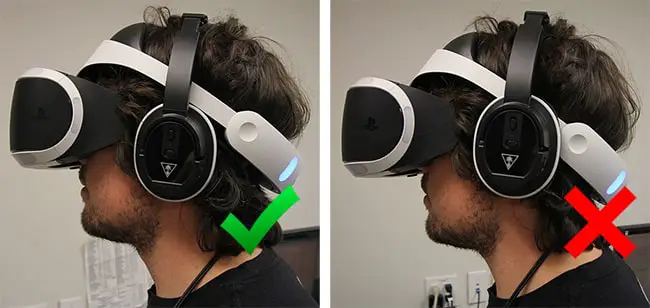
Headphone shape: If you go with headphones, you need to make sure the headphones will fit properly around the PSVR headset. All the headphones on my list above should work fine.
Pro tip: Position the PSVR headset above the headphones, so it sits gently on top of the over-ear headphone on each ear rather than having the headset resting on your ears with the headphones over the headset.
-
Sound Quality: I understand budget may play into your choice, but keep in mind the point of getting headphones is to improve the sound quality over the PSVR’s built-in headphones. The quickest and easiest way to determine the relative sound quality of a pair of headphones is to check the reviews. What do people who have used the headphones think? If you want to get a more detailed analysis of what makes a high-quality sound, I recommend reading this article on headphone sound quality.
-
Sound Cancellation: When in virtual reality, you want to block out as much outside noise as possible. Sound cancellation helps immensely in this scenario. Make sure your headphones have sound canceling technology. Thankfully, most of them do.
-
Weight: Weight isn’t usually a huge factor, because most headphones are pretty light, but if you are planning to wear your headphones for long periods, lighter is better.
-
Mic or No Mic? The PlayStation Virtual Reality headset has a built-in mic. It’s good enough for what most people would need, but it isn’t the best if you want to record your gaming, including what you are saying while gaming. Here you may want to consider buying a headset with a higher quality built-in microphone.
Where do you plug headphones into PSVR and PS VR2?
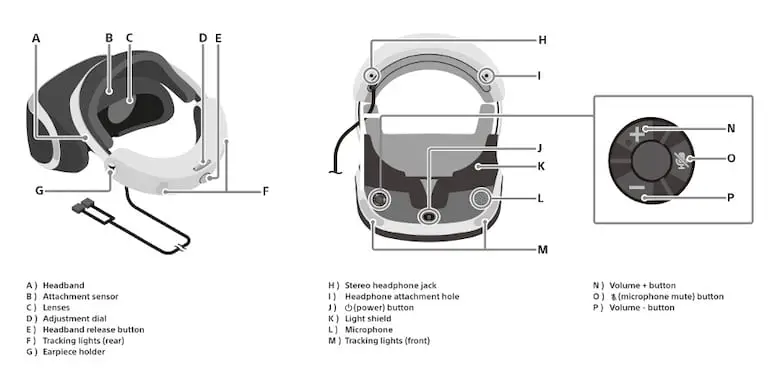
For the second version of the original PlayStation VR headset (model CUH-ZVR2), plug the headphones into the one or two 3.5mm headphone jacks on the underside of the back of the headset. The headphone jack located by the audio controls is stereo if your headphones only have one plug.
If you have the first version of the PSVR (CUH-ZVR1), there is an in-line control box on the cable with a single 3.5mm jack where you plug your headphones.
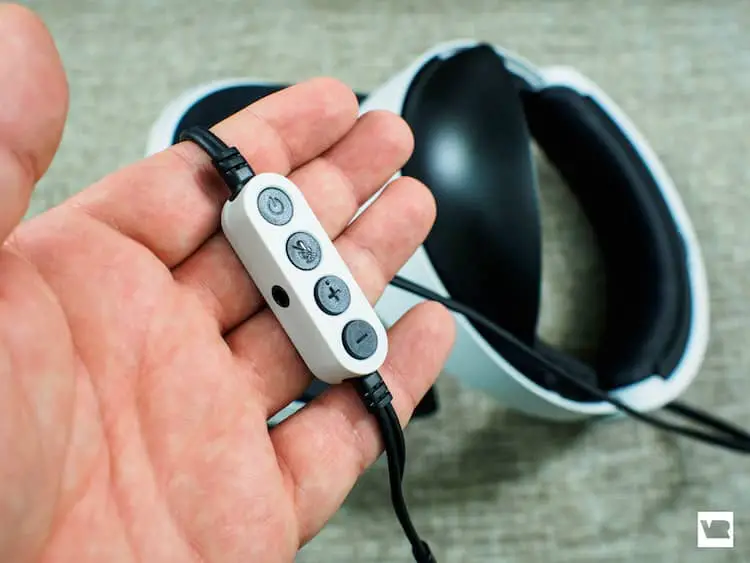
Note: The PSVR integrated headphones can be removed by disconnecting the wire and unsnapping them from the headset.
On PlayStation VR2, there is a single stereo headphone jack on the headset, and the box includes stereo earbuds with three pairs of earpieces, according to Sony’s tech specs and PS VR2 page.
PS VR2 headphones FAQ
Can you use your own headphones with PS VR2?
Yes. Sony says any headphones with a 3.5mm cable that fit comfortably with the headset will work, and so will wireless headphones that connect to the PS5, such as the PULSE Explore earbuds.
Do AirPods or other Bluetooth headphones work with PS VR2?
Not directly. Sony says Bluetooth headphones can't pair with a PS5. A third-party Bluetooth adapter plugged into the PS5 can connect them, but Sony doesn't guarantee it will work.
Does PS VR2 have a microphone?
Yes. Sony's specifications list a built-in microphone as the headset's audio input, so you don't need headphones with a mic for voice chat.
Does the PULSE Elite work with PS VR2?
Sony's PS VR2 FAQ covers wireless devices that work with the PS5, and the PULSE Elite connects to the PS5 through its PlayStation Link USB adapter. But Sony names only the PULSE Explore for PS VR2, and we haven't tried the PULSE Elite's headband with the headset.
Do my old PSVR headphones work with PS VR2?
Wired ones do: PS VR2 has the same kind of 3.5mm jack. Wireless headsets work only if they connect to the PS5. Bionik says its Mantis Pro clip-on headphones fit both headsets.
Where do you plug headphones into PS VR2?
Into the stereo headphone jack on the headset, which Sony lists as its audio output. Wireless headphones connect to the PS5 instead, usually through a USB adapter.
Where to start with PS VR2 and PSVR headphones
For PS VR2, start with the earbuds in the box. A wired 3.5mm pair you already own costs nothing to try. Clip-on headphones such as the Bionik Mantis Pro or Globular Cluster PH2 avoid a second headband, and PULSE Explore is the wireless option Sony names. Skip Bluetooth headphones unless you’re willing to add an adapter Sony doesn’t guarantee.
For an original PSVR, any comfortable wired pair with a 3.5mm plug does the job. The original author’s top pick, the Sony PlayStation Platinum Wireless Headset, still works through its 3.5mm cable if you own one, but Sony no longer lists it.
If you’re still choosing a headset, our PS5 VR headset guide covers PS VR2 availability and the best VR headset guide compares the alternatives. For Meta Quest, see our Quest 3 and 3S headphones section.
Research behind this guide
Check the linked specifications and support documents, or read how we research. Original review experience stays attributed to its author.
View 13 sources
- Sony: PS VR2 technical specifications and audio FAQ
- Sony: PlayStation VR2 (in the box; 3D audio note)
- Sony support: How to connect your PULSE Explore wireless earbuds
- Sony UK support: Can I connect my regular Sony Bluetooth headphones to my PS5?
- PlayStation Direct (US): PULSE Explore wireless earbuds
- Sony: PULSE Explore wireless earbuds
- Sony: PULSE Elite wireless headset
- Sony: PULSE 3D wireless headset
- PlayStation Blog: PlayStation Pulse and Pulse Edge wireless headsets (15 September 2026)
- Bionik: Mantis Pro for PlayStation VR2
- Sony: PlayStation accessories
- PlayStation VR (Wikipedia)
- Sony: Important notice (PlayStation Camera adaptor)
Explore the related guides in VR accessories.