Pimax 5K Plus VR Headset Review: Is It Still Worth It?
We may earn a commission when you buy through links on this page. As an Amazon Associate I earn from qualifying purchases. How this works
Consider a used Pimax 5K Plus only if you already own a suitable gaming PC, SteamVR base stations and compatible controllers. It offers a wide field of view, but those tracking parts were sold separately and future software support is uncertain. A first-time buyer should price and verify the complete setup before buying. Compare the newer Crystal models in current alternatives, including their field of view and built-in tracking.
A wide field of view can make the Pimax 5K Plus appealing on the used market. Getting it running takes more than the headset: your PC, tracking hardware and controllers all need to fit the setup.
Dustin’s original review walks through PC requirements, the display, controllers and software. Read the status notes before relying on those historical impressions, then compare newer Pimax headsets to see which parts you would need.
Product status and source notes
No longer sold new: the 5K Plus launched in 2018, according to Wikipedia. Its old product page in the Pimax store now returns an error, and Pimax’s website lists only the Crystal Light, Crystal Super, Dream Air and Dream Air SE. Any 5K Plus you find today is old or second-hand stock.
Still usable? Yes, with caveats. It is a PC headset that uses SteamVR base-station tracking and needs Pimax’s own PC software, so you also have to find base stations and SteamVR controllers, which are not included. HTC still lists the Base Station 2.0 as an accessory, but its original Vive controllers no longer appear in its accessory line-up. We could not confirm how long Pimax will keep supporting the 5K Plus in its current software.
Consider instead: Pimax’s Crystal Light, which has higher resolution and inside-out tracking, so it needs no base stations, though its field of view is narrower (see current alternatives). Checked 24 September 2026.
Original review introduction
Even though they’re not one of the major VR developers, Pimax has been putting out quality headsets for the past few years.
When this review was written, the company had just put out its then-new slate of headsets, and they had improved in some major areas.
In this Pimax 5K Plus VR headset review, I’m going to let you know what the headset does right, and where I think it sucks. Is it something that stacks up well to the likes of Oculus and HTC?

Before You Buy a PC VR Headset Like the Pimax 5K Plus
There are a few different types of VR headsets that you can buy these days: mobile, video game console headsets, and PC VR headsets.
The Pimax line falls into the latter, and there are some things you should think about before you consider buying a PC headset, as you can quickly find yourself in over your head.
Make Sure Your Rig Can Handle VR Gaming
Not just any PC that you buy will work with VR. Heck, most of the computers you pick up off the shelves of a retailer like Target or Walmart won’t be able to sniff VR gaming’s jockstrap.
You’re going to need some serious firepower to handle the processing of the visuals of VR, as there’s double the work being done to deliver the experience to your eyes.
Generally speaking, the target specs for a gaming PC to be able to run VR are as follows:
- An Intel Core i5 4590 or AMD FX 8350 or better
- An NVIDIA GeForce GTX 1060 or AMD Radeon RX 480 or better
- 8 Gigs of RAM or more
- Video output of DisplayPort 1.2 or better
- At least 1 USB 3.0 port or better
- Windows 10
Note: these were typical minimums when the review was written. Pimax’s own system requirements for the 5K Plus list a GeForce GTX 1060 (6GB) as the minimum and a GTX 1070 or above as recommended, with an Intel Core i5-9400 or higher; HDMI is not supported. Pimax’s current Crystal Light needs a DisplayPort 1.4 output and a graphics card in the RTX 2070/2080 class or better, according to Pimax.
Do You Have Room for Room-Scale Experiences?
There are some wicked VR games that have you sitting in your chair while you experience a new world, but some of the best games have you moving around a room to give you full immersion.
If you want these room-scale experiences, you’re going to need to make sure you have enough room to move around in. For my VR setup, I have a space of about 8.5 feet by 8.5 feet, and that’s adequate.
If you have anything less, you risk crashing into your mom’s china cabinet.
Are You Okay With PC’s Pitfalls?
You can do nearly anything with a PC, but there are some pitfalls present with the tech.
Unlike a console, you have to update drivers with your PC, and there’s a lot of times where updates don’t work smoothly. Are you okay waiting this out and working to solve the issues on your own?
Are you okay with a potential virus popping up and making your life miserable for a bit?
If the answer to these is “no”, you may be better off looking toward console VR or mobile VR.
The good thing is that if you are okay with some small issues that can pop up, then you’re likely an ideal candidate to have a bunch of fun with PC VR.
Presenting the Pimax 5K Plus VR Headset
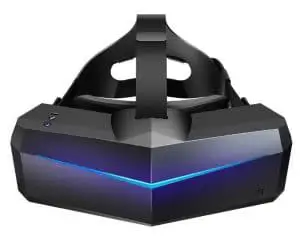
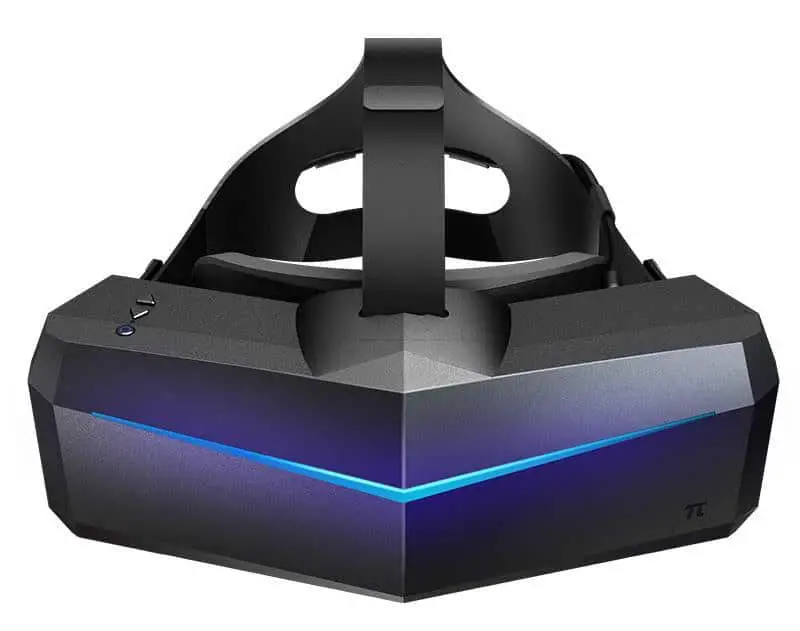
Pimax’s 5K Plus VR headset was the company’s 2018 attempt at bringing high-resolution virtual reality devices to players. It has two 2560 x 1440 panels, one per eye, which was higher than most of the competition at the time; current headsets such as Pimax’s own Crystal Light now use 2880 x 2880 per eye. This is combined with an ultra-wide 200-degree diagonal field of view (FOV), which keeps you from stretching your vision.
The end result is a very immersive experience that stacks up well against the likes of the Oculus Rift or HTC Vive.
Specs
- Two 2560 x 1440 LCD panels for a 5120 x 1440 display
- Weight: 470 grams
- Refresh Rate: 90Hz
- Field of View (FOV): 200 degrees (diagonal, as claimed by Pimax)
- USB 2.0./3.0 ports
- Display Port 1.4 compatible
- 3.5mm headphone jack built-in
- Compatible with gamepads/motion tracking
Note: the 200-degree figure is Pimax’s claimed diagonal field of view on the widest setting. MRTV’s 2018 review describes it as around 170 degrees horizontal, while Wikipedia’s comparison table lists 140 degrees. Pimax’s 5K Plus product page has been removed, so we could not recheck the weight, refresh rate or port details against an official source.
Pros
- Lightweight
- High-resolution panels
- A built-in headphone jack lets you use your favorite headset
Cons
- Doesn’t come with motion controllers out of the box
- Doesn’t work with Oculus ecosystem
- No longer sold new by Pimax
View the listing on AmazonPaid link · Historical or unverified listing
Features and Benefits of the Pimax 5K Plus VR Headset
The Pimax 5K does bring a lot to the table in terms of being a capable VR headset.
While it may not come with all the bells and whistles of the big boys, it certainly packs in some compelling features, and below I’ll explain just what those are.
Immersion Quality
The overall goal of being in VR is to be immersed in a new world. If the headset doesn’t do that, it’s not doing its job. Thankfully, the Pimax 5K Plus does a fantastic job of making you feel like “you’re in the game”.
This is largely due to that impressive display and wide FOV. I especially noticed the difference while I was playing seated experiences, as flight simulators and race cars gave me the feeling of being “there” when I was looking at gauges and dials. Room-scale experiences were good too, albeit not quite as good as what you get with the HTC Vive.
Room-Scale Experience
The Pimax 5K Plus does have the ability to have your motions tracked, but the technology isn’t quite as accurate as the inside-out tracking on the Rift S. It does use the same Steam VR tracking base stations as the HTC Vive, but for some reason, the accuracy doesn’t seem to be as good.
I’m not saying that the tracking sucks, but it could use some improvement.
Being in a large room does help things, as when I was confined, I noticed things got a bit dicier in terms of messing up tracking.
Controllers
You don’t get motion controllers out of the box with your Pimax 5K Plus, which is a bit of a letdown as other headsets come standard with them. Instead, you need to shell out for the base stations and wireless controllers.
Build quality is nice on these, and they do work well. I will say that they’re not as comfy as the HTC Vive Controller, but I consider those to be the best in the industry.
Build Quality
If you were expecting this headset to be a piece of junk, then I’m sorry to inform you that you’re wrong.
Pimax put a lot of time into designing these headsets, and even though I think they look a bit funky, the design is well done. I feel that the headset is solid without being bulky, and it definitely “feels” like a quality device.
Video Quality
When this review was written, the display in this Pimax 5K Plus was second to perhaps only the Pimax 8K in terms of video quality.
The LCD screens are fantastic, and everything does seem to be a bit sharper than what you’ll find from other headsets that are available. Pimax says that you can “say goodbye to SDE (screen door effect)” with this headset. I think that claim is a bit bold, as I can still notice a bit of SDE with the 5K.
With that said, it was a lot better than with every other headset on the market at the time. Newer headsets, including Pimax’s Crystal range, have since overtaken it on resolution.
Aside from resolution, the colors on the screen are well-done, and the refresh rate is high enough that you don’t see any ghosting effects. This is key for fast-moving games, as anything less than ideal will ruin your experience and possibly see you puking.
Audio Quality
Audio isn’t built-in with any external speakers, but there is a 3.5 mm headphone jack that lets you choose the headset that you want to use. You can use Bluetooth headphones, but you want to make sure you’re using something with Bluetooth 5.0, as lower versions can cause some lag between your computer and the headset.
Using a straight-set of headphones is good, and there’s no crackling or any sort of funny business with the jack, which is due to the high build quality.
Software
There is software available to help download games and manage your device.
The software is called PiTool and it looks and feels a lot like HTC’s software.
There’s a good reason for this: it really serves as a vehicle to launch SteamVR on your computer, and it has the base station calibration tool built right in.
The Oculus ecosystem remains the best in the industry and is my preferred way to download games.
If you don’t mind Steam’s platform, it’s more than sufficient for most people out there (I’m just picky).
Note: according to Wikipedia, Pimax headsets of this generation are not native SteamVR headsets and need PiTool installed. Pimax’s current headsets use newer software, and we could not confirm which version Pimax recommends for the 5K Plus today. Its 5K and 8K support pages still carry the PiTool manual, so check them before buying second-hand. The Oculus platform is now run by Meta.
Ease of Use
Using the Pimax isn’t as easy as plugging in an Oculus headset and launching the app.
There is quite a bit of setup involved, albeit with clear instructions from the company.
The PiTool does help a lot, but I was less than impressed with the setup when compared to the competition.
This device just isn’t as user-friendly. This doesn’t mean it’s bad, but if you’re not too technically savvy, it should give you pause when deciding on the device.
Comfort
The Pimax 5K Plus does have a nice feel to it, and when you put it on that quality translates to feel.
Weight is well distributed across your head, and you can use the device for extended periods without feeling too much strain on your neck.
If there is a downside here, it’s that Pimax doesn’t do anything to pad your nose, and this has two consequences. The first is comfort, as you can feel some wear on your nose, especially if you move around and the piece gets knocked against your schnoz. The second consequence is a bit of light bleed, as some did seem to creep in under my enormous beak.
Another area where I’m concerned is the stitching on the headband. I’ve seen a bit of wear on mine, despite only logging about 20 hours on the device as of press time. I have also seen that others have seen some fraying on their straps as well.
Customer Support
If any issues do arise on your end, I can vouch for Pimax’s customer support.
The group has a ticketing system for issues, and the team is fast to respond to any problems you have. I got an answer from the team in just a few hours, and there is an extensive forum that’s members are really good at helping out newbs.
I do wish there was an instant messaging input, as I like instant gratification, but overall I am pretty happy with how the team performed as a whole.
What Others Have to Say About the Pimax 5K Plus VR Headset
The Pimax was very popular among VR enthusiasts when this review was written, but I wanted to see what others really think about the headset. I went and searched around the web to find other honest reviewers, and found that most are impressed with the headset. Unsurprisingly, the resolution seems to be a strong selling point for most.
The YouTube channel PWNDSHOP, for example, compared the resolution of the Pimax 5K’s screen against other devices. The video that was embedded here is no longer part of the page.
Is the Pimax 5K Plus Still Worth Buying?
The Pimax 5K Plus is a stellar device, and it deserves strong consideration as being your next VR headset.
The display is very detailed, the FOV is a gamechanger, and the build quality is nice. I do think that not including controllers and base stations sucks, and wish those could be included.
Still, this is a great little device and was worthy of your money when it was on sale.
Today the picture is different: the 5K Plus is no longer sold new, it needs separately bought base stations and controllers, and Pimax’s own current headsets offer more resolution without external tracking. We would only consider a 5K Plus second-hand, at a low price, if you already own SteamVR base stations and controllers.
View the listing on AmazonPaid link · Historical or unverified listing
Current alternatives to the Pimax 5K Plus
As of September 2026, Pimax’s website lists four headsets:
| Headset | What Pimax says it is for |
|---|---|
| Crystal Light | High-resolution PC VR at a lower price |
| Crystal Super | Flagship clarity and the widest field of view |
| Dream Air | Ultra-lightweight headset for long sessions |
| Dream Air SE | Smaller micro-OLED headset at a lower price |
The closest successor for most 5K Plus owners is the Crystal Light: 2880 x 2880 pixels per eye, 72/90/120 Hz, a 110-degree horizontal field of view and a direct DisplayPort 1.4 connection. It tracks with four built-in cameras, and Pimax sells an optional Lighthouse faceplate if you already own SteamVR base stations. Its field of view is narrower than the 5K Plus’s, so if ultra-wide FOV is what you want, look at the Crystal Super. The Crystal Super goes up to 3840 x 3840 per eye and up to 140 degrees horizontal, with swappable QLED or micro-OLED optical engines.
For headsets from other brands, see our guide to VR headsets for PC, or read our review of the Pimax 8K, the 5K Plus’s higher-resolution sibling.
Pimax 5K Plus FAQ
Is the Pimax 5K Plus discontinued?
Yes. Pimax no longer lists it: its store page for the 5K Plus returns an error, and Pimax’s website shows only the Crystal and Dream Air headsets.
Does the Pimax 5K Plus come with controllers?
No. It uses SteamVR tracking, so you need separate base stations and SteamVR-compatible controllers.
What is the resolution of the Pimax 5K Plus?
Two 2560 x 1440 LCD panels, one per eye, for a combined 5120 x 1440, according to Wikipedia.
Research behind this guide
Check the linked specifications and support documents, or read how we research. Original review experience stays attributed to its author.
Explore the related guides in VR headsets.