
Canbor Virtual Reality Headset Review
We may earn a commission when you buy through links on this page. As an Amazon Associate I earn from qualifying purchases. How this works
Use an existing Canbor only for simple phone VR. Check its listed 4.0–6.3-inch phone range and install a split-screen app first. The original review found poor remote support on iOS; YouTube’s Cardboard mode is Android-only. Canbor’s site was parked and its Amazon listing unavailable at the September 2026 check. For tracked games, compare the standalone alternatives before buying old stock.
Headset alternatives discussed in this guide

Meta Quest 3S
128 GB configuration
Standalone VRStandalone games with Fresnel lenses.
Check first: Check the app library, optical fit and return policy.
Check price on Amazon Paid link · Amazon
Meta Quest 3
512 GB configuration
Pancake opticsPancake lenses and a higher-resolution display than Quest 3S.
Check first: Compare the complete purchase, including any accessories.
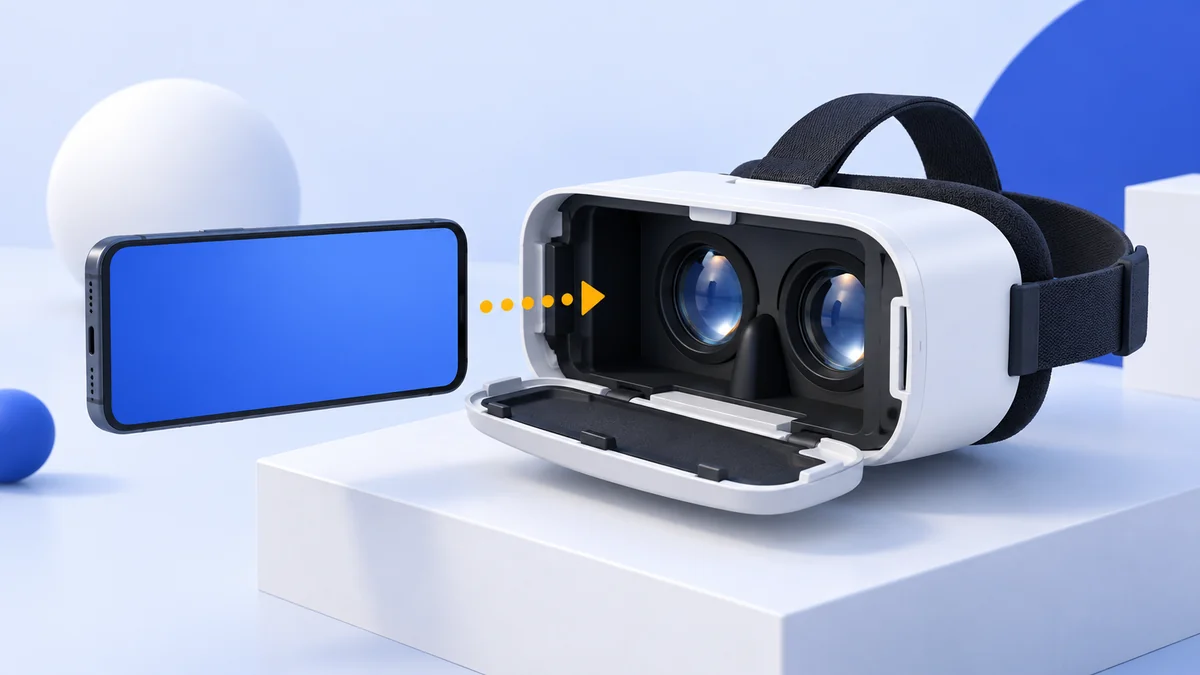
Check price on Amazon Paid link · AmazonThe Canbor VR headset puts a phone behind adjustable lenses and adds a Bluetooth remote. Its listed 4.0–6.3-inch fit range and limited iOS remote support are worth checking before your first session. It is best understood as a simple viewer for phone VR.
The original review covers build, comfort, lenses, controller behavior and software. The status notes and alternatives explain what remains useful and help you decide whether a phone viewer or a standalone headset better matches your plans.
Product status and source notes
Still sold? We treat it as discontinued. Canbor’s own website, canbor.com, now redirects to a domain-for-sale page, and the Amazon listing linked in this review shows it as currently unavailable, so we couldn’t confirm stock or a current price. Any units still on sale are likely old stock.
Still usable? Yes, as a basic phone viewer. It has no electronics apart from the Bluetooth remote, so it works with apps that offer a Cardboard-style split-screen mode. The Google Cardboard app is still offered for Android and iPhone (the iOS version needs iOS 15 or later), but YouTube’s Cardboard mode works only in the Android app. Check your phone size first: the bay takes 4.0 to 6.3-inch phones, while Apple’s Pro Max iPhones have 6.9-inch screens.
What to consider instead: a Cardboard-compatible viewer sized for your phone for 360-degree video, or a standalone headset such as the Meta Quest 3S for real VR games. See What to buy instead.
About the original review: The review below was published in January 2020. First-person observations and original product comparisons refer to that coverage. Later status and compatibility notes are labelled separately.
What You Need to Think About Before Buying a VR Headset
Original review context (January 2020):
The Canbor VR headset is a great introduction to virtual reality, but it is lacking for gamers or those who want a deeper experience. After finding the Canbor VR headset, I feel that the model is a decent starting point for beginners.
Virtual reality headsets are becoming more and more popular as entertainment devices. These headsets allow you to become more immersed and involved in an experience, whether it be a film, game or live music event.
If you want to enjoy new experiences or are just curious about this new technology, then virtual reality headsets are the right product for you.
While tech-savvy adults aged somewhere between 18 to 50 are the most enthusiastic users, there are so many models these days that anyone can find one that is right for them.
Gamers can use VR headsets to enhance their gaming experience, or if like me, you are a film and music lover, you can enjoy a richer experience. It’s also a great product for people that love to learn new things, or for the casual user who just wants to play around and have some fun. VR is also becoming more and more of a sociable activity.
I’d recommend thinking about the following features before making a decision to buy a VR headset:
- Hardware: Is the product well built? What is the functionality of the headset and controller like?
- Software: What games and apps are available? What consoles or devices is it compatible with?
- Visual: How good are the visuals? Are they provided through a mobile phone, a computer, or the headset itself? Each one of these has their own benefits and flaws.
- Comfort: is the headset comfortable to use and wear? If you want to use the device for long periods, you’re going to want the headset to be as comfortable as possible.
- Value for Money: is the product offering a good experience for the price? You are putting down your hard-earned money after all, you want to make sure that the headset is going to deliver something of value for you, and if it’s garbage, you won’t be happy.
Presenting the Canbor VR Headset
The Canbor VR headset is an affordable model for people who are curious about virtual reality.
The company has continually improved their design, making the head straps more comfortable in this version. In the box you’ll get the headset, as well as a controller, a black light shield plate and a cleaning cloth for the lenses.
Compared to the leading models, the main difference is that you have to put your phone inside the headset itself to play games or use apps for the Canbor whereas for models like the PlayStation VR or the HTC Vive, you do not.
The Canbor VR headset is definitely not suited to gamers or experienced VR users, as this headset is just marginally better than the ‘cardboard VR’ models, such as the Google Cardboard. These types of VR headsets are more aimed at a younger audience or those just getting started with virtual reality.
The headset boasts high definition visuals (that are delivered through your phone’s screen), along with a lens that has anti-radiation and anti blue ray functionality. At a price close to what I might spend in a restaurant on a night out with my friends, it is hard to argue that the Canbor VR headset is not good value for money.
The pros and cons of the product are:
Pros
- Affordable and good value for money
- Easy to use and setup
- Adjustable lenses, with anti blue light/anti-radiation functionality
- Built with durable materials
Cons
- Interactiveness is very limited
- Visual immersion is of a low quality
- Poor choice for gaming
- Very poor functionality of the remote controller for iOS devices
- No in-built audio
Note: this link goes to a different budget viewer, the iJoy VR glasses, not the Canbor. We cover it in our iJoy review.
Benefits and Features of the Canbor VR Headset
Let’s look at the actual headset and what comes with it.
The headset is well built and looks very durable, plus you also get a black light shield plate and a cleaning cloth to look after the lenses.
Build Quality
Smartphones that are 4.0 to 6.3 inches long can fit in the headset’s semi-enclosed cabin, where the phone is held in place with a magnetic clamp. There is space in the cabin for you to connect headphones to your phone but your phone case may need to be removed for it to fit.
With the Canbor VR, it has a unique locking case system and adjustable lenses. The field of view is 120 degrees which means you can watch YouTube videos, films or live music as if you are in a cinema, with adjustable pupil distance and focus distance. Nevertheless, the resolution does depend on the smartphone you use.
The materials used to make the headset feel durable, but lightweight at the same time, making it pleasant to use as well as being accessible to children and adults of all ages.
Comfort
The adjustable T-shaped head belt is a product of continuous improvement over previous Canbor models, providing better fit and greater comfort. Also, since previous models had some issues with overheating and lack of heat dissipation, Canbor slightly changed the design of the cabin in this version to improve the comfort.
You will find with previous models, it overheats and you become sweaty after extended use, but they have definitely made some improvement in this area. One of the first things that stood out to me when I held the Canbor VR headset in my hands was the leather cushioning around the device.
I like that your skin can still breathe when you’ve got the headset on and the materials are eco-friendly. Regardless, one minor drawback for me is the lack of additional padding around the nose area, which would make it more comfortable.
Lens Quality
The most interesting feature of the hardware are the adjustable lenses, which brings a bit of a personal touch as you can adjust the lenses to suit your eyesight.
You can adjust the pupil focus with a knob on the top of the headset and for the focus distance, you can use the knob on the side of the headset. The lens itself is made of PMMA, or plexiglass, a lightweight and shatter-resistant alternative to glass.
One thing I personally like, as someone who wears glasses, is that you do not need to wear your spectacles to use the Canbor model. Also, your eyes are protected somewhat by the anti-radiation and anti-blue ray lenses.
People who suffer from myopia, or nearsightedness, can adjust the pupil distance and focus distance to their own needs and project the image in front of their eyes so that their glasses are not needed. However, the distance between the lens and the smartphone screen sometimes makes it feel like you are sitting at the back of the cinema.
The Controller
Now, let’s look at the Bluetooth controller. The button layout can be confusing at times, since you cannot see the controller when you have the headset on. The tracking is not of the highest standard with this controller, being mediocre at best.
Another problem with the controller is that it does not work with iOS smartphones, so this is a very important factor to consider. If you have an iOS smartphone, you’re best avoiding the Canbor VR headset altogether. If you are like me and have an Android device, keep reading.
The Software
As a headset that is based on your mobile phone, you are limited by your smartphone’s capabilities. Apple users may have a hard time finding VR apps, as the software giant curates the App Store heavily to ensure decent content.
Conveniently, the headset comes with a QR code on it so you can quickly download the Google Cardboard app. The Google Cardboard app will launch you into VR experiences that interest you and essentially brings VR capability to your smartphone when you are using it with the VR headset. For instance, the app includes a tour guide that gives you the opportunity to see the sights of Versailles.
Android users will have a more open experience, as there’s many more apps available in the Play Store. Cardboard is obviously available there, and there are lots of excellent VR game options.
Whatever your interests, there are plenty of apps to keep most people entertained.
Note: the Cardboard app is still listed for both platforms, and according to Google’s setup guide you still pair a viewer by scanning its QR code. Google itself stopped selling Cardboard viewers in March 2021 and has kept the platform going as an open-source project. Many of the phone VR games from this era are no longer maintained, so today a viewer like this is mainly for 360-degree video and simple demos. YouTube’s Cardboard mode, the easiest source of 360-degree video, is not supported on iPhone.
Social Proof
After searching the internet for some reviews of the Canbor model, I came across mostly positive feedback.
For instance, on the Canbor website (now offline) one user praised the comfort and ease of use of the Canbor VR headset, saying “it’s insanely lightweight and easier to use than most.”
One reviewer on Amazon mentioned that they bought the product because of the adjustable lens feature. After looking for models that are comfortable and practical, the parent bought the Canbor for her son because she says her “…son doesn’t need to wear his glasses with this VR headset.”
Another reviewer explains the Canbor device is not as good as the Oculus Go but “for the price it’s totally worth it to watch 360 videos and movies.”
View the listing on AmazonPaid link · Historical or unverified listing
Alternatives
To get a good idea of what’s available instead of the Canbor headset, you should consider alternatives that might better suit your needs.
Samsung Gear VR Headset
Firstly, the Samsung Gear VR headset provides a much better visual experience and a wider range of features, but comes a higher price. While you can use a wide range of smartphones with the Canbor, the Samsung Gear VR is only compatible with Samsung phones.
Another key difference with the Gear VR is that you can record your own 360 degree videos if you buy the Samsung Gear 360 as well.
If the Samsung model sounds like a better choice for you, find out more in our Gear VR review.
Note: the Gear VR is no longer an option. Samsung stopped making it, and in March 2020 Oculus stopped adding new Gear VR features and withdrew its Oculus Video and 360 Photos apps from download; Samsung closed its own XR service on 30 September 2020. It also only works with older Samsung phones.
Similarities
- The Samsung Gear is a bit heavier, but comfort is not sacrificed
- Both are very good value for money
- Both are limited by the software on their smartphones
Differences
- In terms of quality, the Samsung Gear VR offers better entertainment
- Wider compatibility with the Canbor
- You can record 360 videos with Gear VR and 360
- Price
View the listing on AmazonPaid link · Historical or unverified listing
Oculus Quest
Another alternative you may want to consider is the Oculus Quest all-in-one VR gaming headset.
The Oculus Quest provides a more high-quality VR experience in terms of visuals, audio and motion tracking than the Canbor VR headset making it more suited to gamers. It is also accessible as the Quest is not powered by a PC but one downside for the Quest is that the battery runs out quite quickly.
So if you are an experienced VR user or gamer, take a look at the Oculus Quest here.
Similarities
- The design of the Canbor is good but basic, whereas the Quest is top class
- Both are very accessible
- Both are very good value for money
Differences
- The Quest is built more for gamers and experienced VR users
- People with glasses will have to wear them with the Quest VR headset
- Leather padding
- Two motion controllers with the Quest
- Better tracking with six degrees of freedom tracking
- Price
Note: the original Oculus Quest has been replaced. Meta stopped adding new features from software v50 onwards and ended its critical updates in August 2024. Its current successors are the Meta Quest 3S and Quest 3 (see below).
View the listing on AmazonPaid link · Historical or unverified listing
NOON VR Pro
While Canbor is one step up from the cheapest VR headset, the NOON Pro model is another step higher for those who want a slightly more advanced experience as well as a family friendly device.
If you are looking for a product that focuses more on quality but is still affordable, check out the NOON VR Pro.
Similarities
- Support for Android and iOS smartphones
- Both are comfortable
- Both have good designs and aesthetics
- Anti-blue lenses
- Similar Price Range
Differences
- Cannot fit phones smaller than 4.2 inches
- The NOON has better motion tracking and more functions
- The NOON has a smaller field of view (101 degrees)
- You can stream from your Apple Mac with the NOON via Wi-Fi
- People with glasses will have to wear them with the NOON VR headset
View the listing on AmazonPaid link · Historical or unverified listing
What to buy instead
The Gear VR and the original Quest are discontinued, and the NOON VR Pro’s Amazon listing also shows it as currently unavailable. If you just want to try 360-degree video on a phone, any Cardboard-compatible viewer that fits your phone will do the same job as the Canbor; Google’s help page advises checking the viewer’s website to confirm it works with your phone.
For games and full head and hand tracking, a standalone headset is the realistic choice. According to Meta’s comparison page, Meta currently sells the Quest 3S from $349.99 and the Quest 3 from $599.99 (US prices, checked 24 September 2026). Our Quest 3 vs Quest 3S comparison explains the differences.
Conclusion
The Canbor VR headset occupies a unique product space, making it easy for people to experience good VR experiences on a lower budget. Canbor raises the game for cheap headsets, focusing more on quality in the price-quality trade-off.
With the Canbor, it’s easy to use and setup, affordable, and with the anti-blue ray/anti-radiation lenses, I’m satisfied with my eyes being protected in some way when watching movies or live music events. For the countless experiences and family-friendly design, the low price is definitely worth it.
Note: this verdict dates from the original review. As the headset now appears to be discontinued and phone VR has largely been abandoned, we’d only buy one if you find it cheaply and your phone fits; otherwise see What to buy instead. The original listing is here.
Research behind this guide
Check the linked specifications and support documents, or read how we research. Original review experience stays attributed to its author.
View 12 sources
- canbor.com (domain now parked and offered for sale)
- Google Cardboard (Google AR & VR)
- Google Cardboard app (Apple App Store)
- Google Cardboard Help: Get started with Cardboard (Android)
- YouTube Help: Watch VR videos and 360 videos
- 9to5Google: Google Store stops selling Cardboard VR headsets
- Wikipedia: Google Cardboard
- UploadVR: Samsung Gear VR software updates end
- Wikipedia: Samsung Gear VR
- Meta for Developers: Changes coming to Quest 1
- Meta: Compare Meta Quest headsets
- Apple: Compare iPhone models
Explore the related guides in VR headsets.