Oculus Rift Review: Are the Rift and Rift S Still Worth It in 2026?
We may earn a commission when you buy through links on this page. As an Amazon Associate I earn from qualifying purchases. How this works
Only as a cheap, complete used kit for a Windows gaming PC you already own. Meta stopped making the original Rift in 2019 and the Rift S in 2021, but its setup page still offers the Meta Horizon Link PC app for both, and its PC requirements page still lists them (checked 15 October 2026). Meta has not published an end-of-support date.
Rift S or original Rift? The Rift S needs no external sensors and has more pixels per eye. The original Rift has OLED displays, built-in headphones and a lens-spacing slider, but needs its sensors and more USB ports. For most buyers, Quest 3S or Quest 3 does more: it plays games on its own and connects to the same PC. See our best VR headset for PC picks.

128 GB configuration
Instead of a used RiftPlays games on its own and connects to the same PC by cable, Air Link or Steam Link.
Check first: Your graphics card against Meta’s Link support list.
Check price on Amazon Paid link · Amazon
512 GB configuration
For sharper lensesPancake lenses and 2,064 × 2,208 pixels per eye, with the same PC connection routes.
Check first: Whether the optical upgrade is worth the extra cost for your use.
Check price on Amazon Paid link · Amazon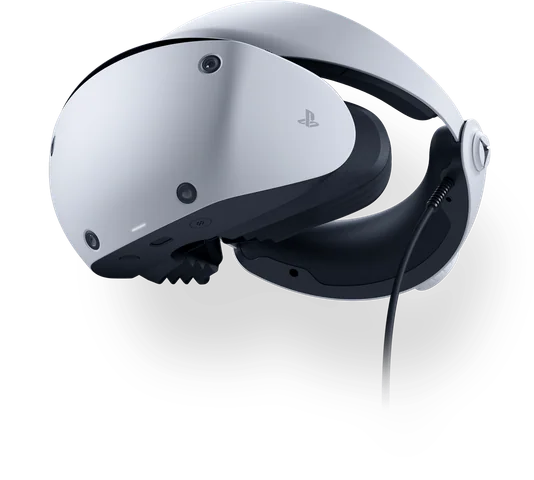
Check the exact retailer bundle
If you also own a PS5Plays PS5 VR games and, with Sony’s adapter, SteamVR games on a PC.
Check first: Sony’s PC adapter needs a DisplayPort 1.4 output and Bluetooth.
Check price on Amazon Paid link · AmazonA used Oculus Rift puts more decisions in your hands than a headset-only listing suggests. You need a suitable PC, working sensors and controllers, and compatible software. An incomplete kit can leave you unable to start playing.
Compare the Rift and Rift S and check the PC requirements first. Dustin’s historical review then covers his buying considerations and the original headset’s display, audio and controllers. Finish with the current alternatives to decide whether an old Rift fits your setup.

Product status and source notes
Not sold new: production of the original Rift (CV1) ended in March 2019, according to Wikipedia, and its successor, the Rift S, was discontinued in April 2021 when Facebook stopped making PC-only headsets. Today you can only find the Rift second-hand.
Still usable? A working Rift can still play PC VR games, but it needs its external sensors, a Windows gaming PC and Meta’s PC software. Meta’s setup page still offers the Meta Horizon Link app for the Rift and Rift S, and its PC requirements page still lists both headsets. Meta hasn’t published an end-of-support date, so treat a used Rift as a cheap experiment rather than a long-term buy.
Consider instead: a Meta Quest 3S or Quest 3, which run standalone and also connect to a PC (see current alternatives). Status checked 15 October 2026.
Original review introduction
In the tech world, the Oculus Rift is considered older than that nasty pair of underwear you’ve been keeping for the last eight years. There have been countless new headsets released since the Rift launched in 2016, but the OG headset stayed popular for years.
In this Oculus Rift review, I’m going to give you a look at the headset, letting you know if it’s still worth your time and money.
Rift or Rift S: what to look for
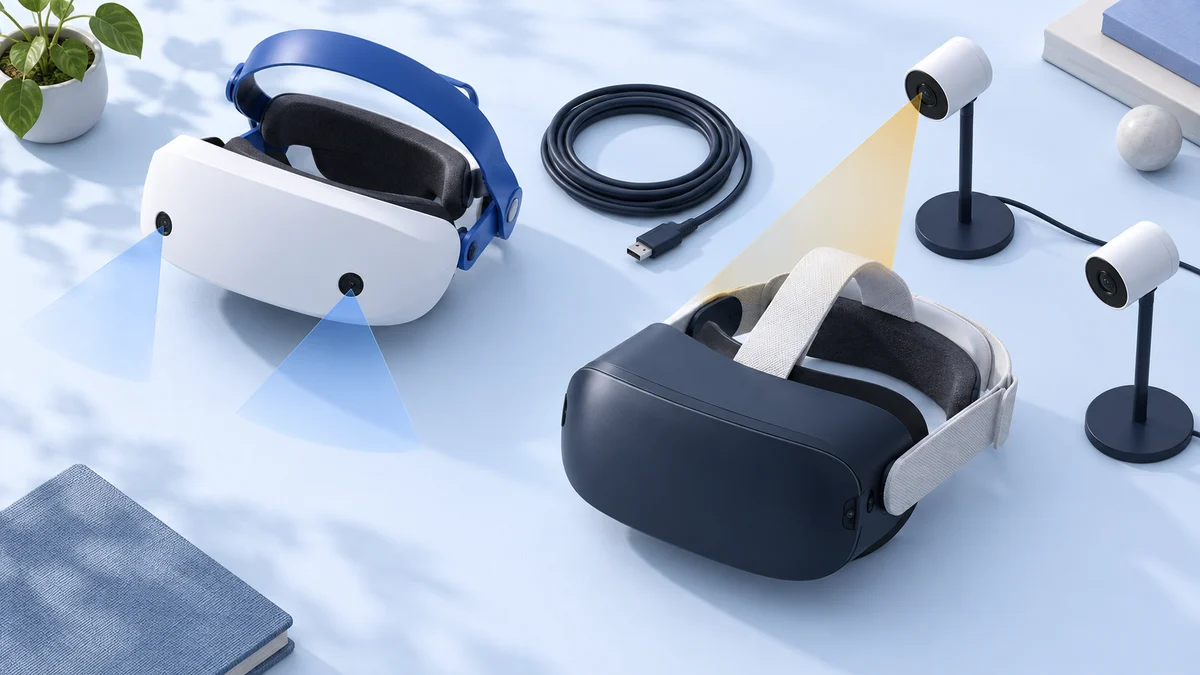
Both headsets are sold only second-hand, and both need a Windows gaming PC for every session. The Rift S is simpler to set up because cameras on the headset track it and its controllers. The original Rift needs external sensors and more USB ports, but it has OLED displays, built-in headphones and a physical lens-spacing slider.
| Original Rift (CV1) | Rift S | |
|---|---|---|
| Sold new | 2016 to 2019 | 2019 to 2021 |
| Display | Two OLED panels, 1,080 × 1,200 pixels per eye, 90 Hz | One LCD panel, 1,280 × 1,440 pixels per eye, 80 Hz |
| Tracking | External Constellation sensors (later bundles included two) | Five cameras on the headset |
| Lens spacing | Hardware slider | Software setting only |
| Audio | Built-in headphones | Speakers in the headband |
| Video connection | HDMI 1.3 | DisplayPort (adapter included for Mini DisplayPort) |
| USB ports Meta recommends | Three USB 3.0 and one USB 2.0 | One USB 3.0 |
| Weight | 470 g | 500 g |
Specifications come from Wikipedia’s Rift CV1 and Rift S articles; connections from Meta’s PC requirements.
Before paying for a used kit, check:
- Original Rift: the headset, both Touch controllers and at least two sensors, plus enough free USB ports on your PC.
- Rift S: the headset with its cable, both Touch controllers, and a DisplayPort output on your graphics card. The lens spacing is a software setting, so try the headset on first if you can.
- Either model: that it starts and tracks in the Meta Horizon Link app on a Windows 10 or later PC.
PC requirements for Rift and Rift S
Meta still publishes requirements for both headsets on its Meta Horizon Link PC requirements page (checked 15 October 2026). The processor, memory and graphics figures are the same for both headsets; the connections differ.
| Minimum | Recommended | |
|---|---|---|
| Graphics card | NVIDIA GTX 1050 Ti or AMD RX 470 (or GTX 960 4 GB / R9 290) | NVIDIA GTX 1060 or AMD RX 480 (or GTX 970 / R9 290) |
| Processor | Intel i3-6100 or AMD Ryzen 3 1200 | Intel i5-4590 or AMD Ryzen 5 1500X |
| Memory | 8 GB | 8 GB |
| Windows | 10 or later | 10 or later |
| Rift S connections | DisplayPort or Mini DisplayPort (adapter included), one USB 3.0 | DisplayPort, one USB 3.0 |
| Original Rift connections | HDMI 1.3, one USB 3.0 and two USB 2.0 | HDMI 1.3, three USB 3.0 and one USB 2.0 |
Meta ended Rift support for Windows 7 and 8.1 in January 2020. These are requirements for the headsets; individual games can ask for more. To find your graphics card and check a laptop’s video outputs, use our VR PC requirements guide.
Things to Consider Before You Buy a PC VR Headset
If you’re looking to get a PC VR headset, you likely know a bit about the technology. VR headsets for PC give the best experiences currently available and are much better than the mobile headsets you see old people picking up for their grandkids at Walgreens.
The primary consumer for a PC VR headset is someone who is tech-savvy and knows how to update drivers, install equipment, and more. If you’re comfortable with that, then you’ll probably love PC VR.
With that said, you should consider the following before dropping coin on a headset:
Your PC Build
You’re not going to get away with using VR using that laptop that your mom picked up from Target for $300.
VR requires heavy-duty graphics cards, as there’s double the image processing going on (one for each eye).
You need to make sure that your rig can handle VR before you buy a headset, otherwise, you’re going to have a bad time.
What’s Your Budget?
VR is one of those things where I recommend buying the best you can within your budget.
Cheap headsets are crap, and features only get better the higher up the price chain you travel. I’m not saying you need to drop a huge wad for a Vive Pro, but you don’t want to buy some cheap junk that doesn’t do VR justice.
Do You Get Motion Sick?
Are you someone who is prone to getting queasy when you ride rollercoasters?
If so, you may want to stick to standard gaming experiences. No joke, I once saw a girl ralph all over Vive controllers while riding a virtual rollercoaster. Don’t be that girl.
Presenting the Oculus Rift
The Oculus Rift is the granddaddy of VR headsets.
The original device was created by Palmer Luckey, who had a wildly successful Kickstarter to fund the device. Oculus was eventually sold to Facebook, who helped get the Rift to the market.
Since then, Oculus has been at the forefront of the VR industry, releasing an updated Rift (Rift S), mobile-style headset (Oculus Go), and completely wireless solution (Oculus Quest). All three have since been discontinued: the Oculus Go in 2020 (Meta), the original Quest in September 2020 (Wikipedia) and the Rift S in April 2021 (Wikipedia).
The Rift has six degrees of freedom and brings built-in 3D audio and the awesome Touch controllers.
The Rift launched at $599.99 in 2016 and dropped to $499 in March 2017 (Wikipedia). New units are no longer sold, so today you’ll mostly find it used.
Specs
- Display: Pentile OLED
- Resolution: 2160 x 1200 (1080 x 1200 per eye)
- Built-in 3D audio headphones
- 90Hz refresh rate
- Field of view: about 110°
- Includes Touch Controllers and Constellation sensor
- Weight: 470 grams
Pros
- Very immersive
- Excellent Oculus ecosystem
- Touch controllers work well
Cons
- While it’s great, the headset is getting dated
- Not as accurate as some newer headsets when it comes to tracking
- Screen door effect is present
Features and Benefits of the Oculus Rift
The Rift has a lot going for it, and I’m going to spell out the different aspects of the device for you.
While the Rift is great, it’s certainly no spring chicken in the world of technology.
Visual Experience (Still Good, Not Fantastic)
The display on the Rift is good, but it’s not nearly as advanced as some of the newer headsets coming out these days. Still, Oculus did good by putting in a Pentile OLED display with 2160 x 1200 resolution (1080 x 1200 per eye). Apps generally look good in bright environments, but when things get a bit darker you’ll notice the dreaded screen door effect.
Still, visually speaking, the Rift delivers, and there are certain points where they lead to total immersion to games you’re playing.
Audio Experience (Amazing and the Real Deal)
On the surface, you may not think that audio is all that important, but it’s vital to make VR totally immersive.
Oculus delivers in spades here, as the 3D audio headphones are fantastic and attached directly to the headset. Even though it’s three years after release, I still consider the Oculus headphones and audio to be the best in the industry.
Controller Interface is Great
The Oculus Touch Controls have been awesome since their release, as they let you interact with your environment with relative precision. The controllers track well with the Constellation system, and I prefer them over the inside-out solution found on the Quest and Rift S.
A Fantastic Ecosystem
The Oculus ecosystem is wonderful and is easily the best currently available. I find it easy to navigate to different areas, and it’s easy to browse your library or pick up new games.
While you can use Steam VR to pick up and launch games, most of the good stuff is available directly from Oculus and it remains my preferred launcher.
Note: this describes the Oculus PC software as it was when the review was written. The Oculus brand has since been replaced by Meta, the PC app is now called Meta Horizon Link, and Facebook (now Meta) announced in 2020 that it would focus on standalone headsets rather than PC-only hardware.
Still a Great Value Proposition
Even though the Rift is more than three years old, it’s still a great piece of hardware. It’s been discontinued in favor of the Rift S, but that means that you can often find them for a great price on the used market.
This stands up as being a good deal, even when you compare to the HTC Vive, which is equally as old.
There is a Big Caveat Though
I have to say that while the Rift is awesome, Oculus discontinued the headset in the spring of 2019 so that they could bring out the Rift S. This has made the Rift harder to come by, and supply will continue to become more scarce as time goes by.
If you’re thinking you want an OG Rift, you should probably strike now, as they’ll become a relic where folks seek them out like Indiana Jones searches for golden idols.
Update: the Rift S has since been discontinued too, and Facebook (now Meta) said in 2020 it would stop building PC-only headsets. A used Rift only makes sense if it is cheap, complete (headset, both Touch controllers, at least two sensors) and you already have a suitable Windows PC.
What Others Have to Say About the Oculus Rift
The Rift was a big hit among users and reviewers alike. Over the years, opinions haven’t changed too much, as users praise the immersion, build quality, ecosystem, controllers, and more.
Alternatives to the Oculus Rift
While I love the Rift, it is getting older and isn’t the cutting edge tech that it once was.
Because of this, I wanted to provide some good alternatives that also serve as great PC VR headsets. The three below were the original picks and are all discontinued now; the headsets you can still buy new are listed under current alternatives.
Oculus Rift S
The Rift S is the refreshed version of the Oculus Rift.
It has a better screen, different Touch Controllers (notice that I didn’t say better?), and better weight distribution for increased comfort. It’s very similar to the original device but does feature inside-out tracking. It uses a 2560 x 1440 LCD at 80Hz and was co-developed with Lenovo (Wikipedia).
The Rift S was discontinued in April 2021, so it is now also a used-only purchase.
Similarities
- Both Oculus headsets
- Require gaming PC to run headset
- Built-in audio
Differences
- Has inside-out tracking
- Touch Controllers aren’t as great for tracking
Check availability of the discontinued Rift S
HTC Vive
The HTC Vive launched just after the original Rift and has served as the device’s main competitor since that time. The device is also similar to the Rift, as they have the same resolution, but the Vive Controllers are a bit more accurate than the Touch.
You’ll have access to Steam VR, which is great, but it’s not as good as the Oculus ecosystem (at least in my eyes). HTC has since succeeded the original Vive with newer headsets such as the Vive Pro 2 and Vive Focus Vision (Wikipedia), and the original is now mostly found used. Read our HTC Vive review for more.
Similarities
- Both launched in 2016
- Includes controllers
- Comfortable to wear
Differences
- Doesn’t feature Oculus ecosystem
- No headphones included in the box
- Has better tracking through base stations
Check availability of the original HTC Vive
PlayStation VR
If you want a good VR experience but don’t want to drop for a gaming PC, then the PlayStation VR may be for you. Connecting to your PS4 or PS4 Pro, the PSVR is very comfortable and has some excellent games to play, including Ace Combat 7 and Astro Bot VR Rescue.
While the Move Controllers aren’t nearly as good as the Touch Controllers, PSVR is a capable system (and the best-selling headset of all-time). I highly recommend this route if you don’t have a PC.
Sony no longer makes the original PSVR, which was on the market from 2016 to 2024 (Wikipedia). Its successor, the PlayStation VR2, works with the PS5 and, with Sony’s $59.99 adapter, with a PC running Steam VR (PlayStation Blog).
Similarities
- Six degrees of freedom
- Comfortable to wear for long periods of time
Differences
- Controllers aren’t as accurate as Rift/Vive
- Has earbuds that don’t attach to the headset
- Games can be more expensive than on the Rift
Check availability of the original PSVR
Current Alternatives to Consider
If you want a PC VR headset you can still buy new, these are the options we checked. Prices are US list prices as of 24 September 2026.
| Headset | Price | PC VR | Notes |
|---|---|---|---|
| Meta Quest 3S | $349.99 (128GB), $449.99 (256GB) | Yes, via Meta Horizon Link (cable) or Air Link (Wi-Fi) | Standalone; cheapest current Meta headset |
| Meta Quest 3 | $599.99 (512GB) | Yes, via Meta Horizon Link or Air Link | Sharper lenses and display than the 3S |
| Vive Focus Vision Wired Bundle | $1,449 | Yes, including a DisplayPort streaming kit | 2448 x 2448 per eye, eye tracking |
| PlayStation VR2 (also on Amazon) | Varies by retailer | Yes, with Sony’s PS VR2 PC adapter | Some PS5 features, such as HDR and eye tracking, don’t work on PC |
Meta raised Quest prices in April 2026 because of higher memory costs (Meta). Quest headsets connect to a Windows PC with a USB-C cable or over Wi-Fi (5GHz recommended), according to Meta’s Link setup guide. See also our Oculus Rift alternatives.
Oculus Rift FAQ
Why is the Oculus Rift no longer available?
The original Rift went out of production in March 2019, the month Meta announced the Rift S as its replacement. Facebook (now Meta) then stopped making the Rift S in April 2021 to concentrate on standalone Quest headsets, which can also connect to a PC. Both are now sold only second-hand.
Is the Oculus Rift still usable in 2026?
Yes, with a Windows 10 or later PC that meets its requirements. Meta's setup page still offers the Meta Horizon Link app for the Rift and Rift S, and its requirements page still lists both (checked 15 October 2026). Meta hasn't published an end-of-support date, so this could change.
Is the Oculus Rift better than a Quest 3?
Not for most people. Quest 3 has 2,064 × 2,208 pixels per eye and pancake lenses, plays games without a PC, and connects to one by cable or Wi-Fi. The original Rift (1,080 × 1,200 per eye) and Rift S (1,280 × 1,440) work only when tethered to a PC.
Is the Rift S still good in 2026?
Only as a cheap used PC VR headset. It needs no external sensors and connects with DisplayPort and one USB 3.0 port, but its lens spacing is a software setting only, and it has been out of production since April 2021. Compare it with a Quest 3S, which also connects to your PC.
What PC do I need for an Oculus Rift?
Meta recommends an Intel i5-4590 or AMD Ryzen 5 1500X, an NVIDIA GTX 1060 or AMD RX 480, 8 GB of memory and Windows 10 or later. The original Rift also needs HDMI 1.3 and several USB ports; the Rift S needs DisplayPort and one USB 3.0 port. See the requirements table.
Is a Used Oculus Rift Still Worth Buying?
I’ve been using the Rift for years, and I still think it’s better in some ways than the new Rift S.
I highly recommend the headset if you can find it. Seeing as how it’s discontinued, you may have a hard time finding one that’s not used, but the Rift S is a good option if you don’t mind the inside-out tracking.
Today the Rift and Rift S are both discontinued, so a used unit is only worth it at a low price. For most people, a current Meta Quest headset is the simpler way into PC VR. If you still want one of the originals, check the Rift S here.
Research behind this guide
Check the linked specifications and support documents, or read how we research. Original review experience stays attributed to its author.
View 16 sources
- Oculus Rift CV1 (Wikipedia)
- Oculus Rift (Wikipedia)
- Oculus Rift S (Wikipedia)
- Meta: Set up your headset (Rift and Rift S sections)
- Meta: Windows PC requirements for Meta Horizon Link (Rift and Rift S)
- Facebook will discontinue the Rift product line in 2021 (Road to VR)
- An update on the evolution of the Oculus platform (Meta)
- Oculus Quest (Wikipedia)
- Set up Meta Horizon Link and Air Link (Meta support)
- Compare Meta Quest headsets (Meta)
- An update on Meta Quest pricing (Meta)
- Vive Focus Vision Wired Bundle (HTC Vive store)
- HTC Vive (Wikipedia)
- PlayStation VR (Wikipedia)
- PlayStation VR2 (PlayStation)
- PlayStation VR2 players can access games on PC with adapter (PlayStation Blog)
Explore the related guides in VR headsets.