Best VR Headsets for VRChat in 2026
We may earn a commission when you buy through links on this page. As an Amazon Associate I earn from qualifying purchases. How this works
For most new VRChat players, Meta Quest 3 is the headset to buy. It runs VRChat on its own without a PC, connects to a gaming PC later for the PC version, and has sharper pancake lenses than Quest 3S. On the headset itself, VRChat's Android rules limit which avatars and worlds appear; a PC connection removes those limits.
Cheaper: Quest 3S, with the same VRChat versions and simpler Fresnel lenses. PC setup with base stations and eye tracking: Bigscreen Beyond 2e. Valve's wireless route: Steam Frame. If you prefer PICO: PICO 4 Ultra. Full-body tracking is optional and needs separate equipment.

512 GB configuration
Best for most VRChat playersRuns VRChat without a PC and connects to one for the PC version, with pancake lenses.
Check first: Whether your friends’ worlds and avatars need PC VRChat.
Check price on Amazon Paid link · Amazon
128 GB configuration
For a lower-cost startThe same standalone and PC VRChat routes, with Fresnel lenses.
Check first: Optical fit and whether sharper text matters to you.
Check price on Amazon Paid link · AmazonA first VRChat headset should run the version your friends and preferred avatars use. Standalone play avoids buying a PC, but its Android content rules still apply. Comfort, a working microphone and the complete tracking setup matter once that platform choice is clear. For headsets beyond VRChat, see our best VR headset guide.
Compare headset routes, then check app versions, PC requirements, audio and optional body or eye tracking. These research-based recommendations use documentation checked on 13 October 2026. We have not measured current headset comfort or microphone quality. Read how we research.
Choose a headset for your VRChat use
No gaming PC
Check standalone VRChat and Android-compatible content first. Quest 3 or 3S provides a route without buying a computer.
PC-only worlds or avatars
Prioritize a compatible PC setup. A Quest connected to the PC runs the PC version; buying a different standalone headset does not remove Android content limits.
Expressive tracking
Plan the complete hardware and software chain. Eye, face, finger and full-body tracking are different capabilities.
| Headset | Route into VRChat | Reason to investigate | Extra decision |
|---|---|---|---|
| Quest 3 | Standalone app or PC connection | Both app versions; pancake optics | Fit and PC connection if needed |
| Quest 3S | Standalone app or PC connection | Lower-cost entry to the same platforms | Fresnel optics and adjustment |
| Beyond 2e | PC VR | Eye tracking and compact headset hardware | Base stations, controllers and software integration |
| Steam Frame | PC streaming | Valve’s dedicated wireless setup | Check current app support and ordering |
| PICO 4 Ultra | PICO app or supported PC streaming | Alternative where locally supported | App compatibility, region and accessories |
Hardware roles come from Meta, Bigscreen, Valve and PICO. VRChat’s Meta listing, PICO listing and Steam listing establish the relevant app versions.
Meta Quest 3: a flexible starting point
Choose Quest 3 if you want to start with the native headset app and retain a route to PC VRChat. Its pancake lenses and higher-resolution display are the documented reasons to prefer it over Quest 3S. Skip the upgrade if a headset you already own works for your normal worlds and sessions.
Standalone content rules still apply when the app runs on the headset. A PC connection changes which application build runs; it does not just increase a quality slider in the standalone app. For the optical differences, use Quest 3 vs Quest 3S.
Check price on AmazonPaid link
Meta Quest 3S: keep the complete budget in view
Choose Quest 3S when you want current standalone Quest apps and PC flexibility with less spent on the headset. Skip it if the optical upgrade is your deciding priority. More headset storage does not make PC VRChat render faster.
Consider the setup you can afford after purchase: suitable PC hardware if needed, a working connection, and any fit correction. Full-body tracking equipment can wait until you know you want it.
Check price on AmazonPaid link
Bigscreen Beyond 2e: for an established PC setup
VRChat’s own announcement describes its collaboration with Bigscreen on the Beyond 2e VRChat Edition and its eye-tracking feature. Bigscreen’s requirements include a compatible PC, DisplayPort with DSC and SteamVR base stations.
Investigate it if you already have tracking equipment and specifically want eye tracking. Skip it for standalone play or when you want to avoid a base-station setup. Eye tracking does not establish mouth or face tracking, and the headset alone is not the complete controller and audio package.
Valve Steam Frame: check the current software route
Valve’s official hardware page describes its dedicated wireless PC streaming setup and the ordering process. It is worth investigating for someone who wants Valve’s Steam-focused hardware.
Do not assume that a hardware feature automatically reaches a VRChat avatar. Check the current app version, input support and tracking integration you want before ordering. We are not using the presence of hardware eye tracking as proof that a particular VRChat setup supports expressive eye tracking.
PICO 4 Ultra: an alternative with a native app
The PICO VRChat listing currently includes PICO 4 Ultra among its supported platforms. That makes it a documented standalone alternative where the headset and app are available to you.
Investigate it when local support, fit or the PICO ecosystem is a reason to choose it. Skip buying for a tracker alone until you have checked the exact VRChat mode and accessory support. The native Android app still has platform content restrictions; PC streaming is a separate setup.
Choose the right app version
You can start with the Quest app, the PICO app, or PC VRChat on Steam. Desktop play is also useful for trying the service before buying a headset; see VRChat without VR.
Standalone and PC content differ
VRChat limits Android avatar shaders and components to keep the mobile experience workable. For example, avatar cloth, lights and audio sources are unavailable on Android. This is a platform issue, not something a more expensive Quest model removes.
Before buying, ask whether your friends’ usual worlds and your preferred avatars have the appropriate platform versions. Our standalone vs PC VR guide explains how the application build changes with the route.
Check your PC
VRChat’s Steam page lists a minimum i5-4590/FX 8350-class CPU, 4 GB of RAM and GTX 970/R9 290-class graphics. Those are app minimums, not a promise of smooth performance in a crowded instance or compatibility with your headset’s connection software.
Check the requirements for the headset and streaming route separately. Meta’s Link list and Bigscreen’s display requirements can set a higher or different bar. Use our PC VR requirements guide before buying hardware.
For a Quest PC connection, follow Quest SteamVR setup. If the stream is unstable, compare Link and Air Link before attributing every hitch to VRChat or buying another headset.
What matters in social VR
Your priorities differ from a quick solo game. Readable menus and avatars matter, but so do hearing people clearly, speaking through a working microphone and keeping the headset comfortable for your chosen session length.
Plan tracking and comfort
Head, hands and fingers
Six-degree-of-freedom tracking lets a headset follow position as well as rotation. A modern tracked headset and two controllers provide the basic head-and-hand setup. That is enough to begin; full-body tracking is not an entry requirement.
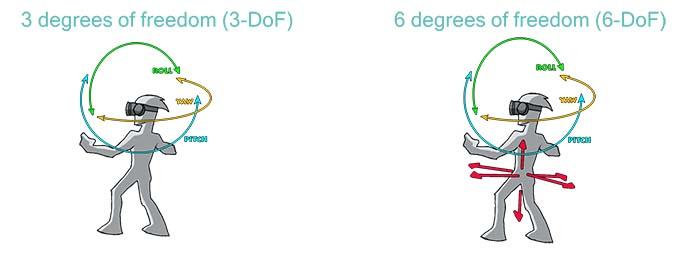
Finger tracking and controller-free hand tracking are separate input features. Compatibility depends on the headset, connection route and app. Do not infer that every gesture mode works on PC because it works in a standalone menu.
Full-body tracking
VRChat documents support for up to eight additional tracking points using Lighthouse ecosystem trackers. These add body information beyond the headset and controllers. Trackers need a compatible setup, assignments and calibration; they are not simply another headset specification.
If starting from scratch, list trackers, straps, base stations where required, wireless receivers and software before estimating the cost. VRChat calls its implementation experimental. Alternative tracking systems have their own support arrangements, so check their documentation rather than assume identical official support.
Eye and face tracking
Eye tracking communicates gaze; face tracking concerns other facial expression. A headset with one does not necessarily include the other. Avatar setup and the software path determine which information appears in VRChat.
Beyond 2e is a documented eye-tracking option worth investigating. Quest 3 and 3S do not include built-in eye or face tracking. Choose an expressive setup only after checking both the hardware and the current integration; avoid buying solely because a product specification lists a sensor.
Audio and microphone
Confirm that voices play through your intended device and that VRChat receives the intended microphone. PC streaming adds audio routing choices, so check a short conversation before changing hardware. We do not have a controlled microphone comparison for these models.
Fit and session length
Compare like-for-like weight figures, including straps and batteries. A very small headset may still require a cable and other equipment; a heavier integrated design includes components that another design keeps off your head.
Use a demo or appropriate returns to assess fit. Our Quest accessories guide helps identify whether a strap or fit change would solve a specific problem before you replace the headset.
What to avoid buying
Avoid phone viewers or rotation-only hardware when your goal is tracked VRChat. Also avoid an incomplete used bundle: missing controllers or tracking equipment can turn a low headline price into an expensive setup.
Microsoft’s WMR deadline is particularly relevant to used bargains. Windows Mixed Reality is removed in Windows 11 24H2; its remaining Steam route on 23H2 is supported only through November 2026. We do not recommend buying into that platform now.
Choose a next step
If you have no PC, verify your standalone content and compare Quest 3 with Quest 3S. If you need PC-only worlds, check the computer before buying the headset. If expressive tracking is the priority, plan every required component and integration.
You can also keep a headset you already own and try VRChat first. An upgrade should solve a limitation you can identify: content access, fit, image quality or a specific tracking feature.
VRChat headset FAQ
What is the best VR headset for VRChat?
Meta Quest 3 for most people: it runs VRChat standalone and on a PC, with sharper lenses than Quest 3S. Quest 3S is the lower-cost alternative. Bigscreen Beyond 2e suits an established PC setup with base stations where eye tracking matters.
Can Quest 3 run VRChat without a PC?
Yes, through the native Quest app. Android content restrictions still apply. Connecting to a compatible PC lets you run the PC version instead.
Does Quest 3 show all PC avatars in standalone mode?
No. Avatars need appropriate platform builds, and Android restricts shaders and components. Buying Quest 3 instead of Quest 3S does not remove those rules.
Do I need full-body tracking?
No. Start with a tracked headset and controllers. Additional trackers are an optional setup with their own compatibility and calibration requirements.
Does eye tracking mean face tracking?
No. They represent different features, and the avatar needs a supported software path. Verify the exact capabilities before purchasing.
Should I replace my working headset immediately?
Try VRChat with it first. Replace it when you can name a limitation the new hardware addresses, rather than assume a new model is required.
Earlier recommendations (discontinued)
The headsets below were recommended in the original 2020 version of this guide. All of them are now discontinued, and the Windows Mixed Reality platform is being retired. We list them, with their original shop links, so returning readers can see what changed. They aren't current recommendations, and anything still offered is likely to be old or used stock.
In its original “Let’s sum it up” section, the 2020 guide named the HTC Vive Pro the best headset for VRChat, for its audio and motion tracking, with the HTC Vive as runner-up. The author called it a close call between the Vive and the Rift: the Vive had better tracking, the Rift better built-in audio, and “you can buy great headphones” but can’t improve tracking.
HTC Vive (discontinued)
The original guide praised the HTC Vive for room-scale tracking with two base stations over an area of up to 15 × 15 feet, while noting it had no built-in headphones. HTC began pulling the 2016 Vive from the market in late 2019, when the Vive Cosmos replaced it (UploadVR). Our HTC Vive review and HTC Vive vs Oculus Rift comparison remain in the archive.
Old Amazon listing for the HTC Vive (discontinued)
Oculus Rift (discontinued)
The Oculus Rift was recommended for its light, intuitive Touch controllers and built-in headphones, with a smaller tracking area than the Vive. Oculus said in March 2019 that the Rift S would replace it, and the Rift line ended when the Rift S was discontinued in 2021 (Wikipedia). See our Oculus Rift review for the historical review.
HTC Vive Pro (discontinued)
The HTC Vive Pro was the original guide’s top pick for its sharper display, built-in headphones and larger tracking area. It was also the “if you’re in a hurry” recommendation at the top of the old article (HTC Vive Pro, old listing). HTC told UploadVR in March 2020 that the Vive Pro was “end of life” (UploadVR). The Vive Pro listing in the old “supported headsets” section pointed to the same product. For the differences between the two HTC headsets, see our HTC Vive vs Vive Pro comparison.
Old Amazon listing for the HTC Vive Pro (discontinued)
Windows Mixed Reality headsets (platform being retired)
The original guide reviewed Windows Mixed Reality headsets as a group. It liked their displays but warned that, because cameras on the headset did all the tracking, VRChat could lose your hands when you gestured outside their view. Microsoft has since removed Windows Mixed Reality from Windows 11 version 24H2, and support with Steam ends in November 2026 (Microsoft Learn). Our HP Windows Mixed Reality headset review is in the archive.
Oculus Go (discontinued)
The original guide included the Oculus Go as a cheap standalone option but advised against it for VRChat because it only tracked head rotation (3DoF), with no hand or body tracking. Facebook announced on 23 June 2020 that it would stop selling the Go later that year and would stop accepting new Go apps and updates after 4 December 2020 (Wikipedia). Our Oculus Go review remains in the archive.
Old Amazon listing for the Oculus Go (discontinued)
This guide replaces an earlier version by John, first published January 2020.
Research behind this guide
Check the linked specifications and support documents, or read how we research. Original review experience stays attributed to its author.
View 27 sources
- VRChat on Steam
- VRChat on Meta Quest (Meta Store)
- VRChat (PICO Store)
- UploadVR: VRChat now on Vive XR Elite, with body tracking support
- VRChat Docs: Full-Body Tracking
- VRChat Wiki: Types of tracking
- VRChat Wiki: Finger Tracking
- VRChat Wiki: Face Tracking
- VRChat Creation: Android content limitations
- VRChat: Announcing the Bigscreen Beyond 2e VRChat Edition
- Meta Store: Compare Quest 3S vs Quest 3
- Meta Quest Help: Windows PC requirements for Meta Horizon Link
- Meta Quest Help: How to use headphones with Meta Quest
- Meta Store: Steam Link on Meta Quest
- Bigscreen: Bigscreen Beyond 2 product page
- Bigscreen: A lower price, a sleek new look and a shipping update
- PICO: PICO 4 Ultra product page
- PICO: PICO launches its first all-in-one VR and mixed reality headset
- VIVE Blog: How to use full-body tracking in VRChat
- Microsoft Learn: Using SteamVR with Windows Mixed Reality
- UploadVR: Quest Pro is now officially discontinued
- Engadget: Valve confirms that it has stopped making the Index VR headset
- UploadVR: Original HTC Vive coming out of the market with Cosmos launch
- UploadVR: HTC discontinues Vive Pro and Focus models
- Wikipedia: Oculus Rift
- Wikipedia: Oculus Go
- Valve: Steam Frame
Explore the related guides in VR headsets.